
TurboTax Home & Business 2025 is my best overall pick in this lineup for freelancers seeking a dedicated business-oriented filing option, while H&R Block Premium & Business 2026 stands out as a newer Windows choice and ComplyRight TaxRight 2026 targets federal and state preparation. The main tradeoffs are tax-year freshness, operating-system compatibility, and whether the software supports the forms your work requires. Several listed products are older editions, so their year labels matter more than their familiar brand names when filing a current return. Read on for the full breakdown of which options fit different freelancer needs and where to check compatibility before buying.

Get smart everyday buys delivered free with Prime
- Fast, free delivery on millions of items
- Prime Video, Amazon Music and more included
- Member-only deals all year
Key Takeaways
- Current tax-year labeling separates the newer choices from the older editions: the 2026 H&R Block and ComplyRight products are the most recent editions listed, while several TurboTax and H&R Block options cover earlier years.
- TurboTax Home & Business has the clearest freelancer-oriented role in this lineup: its business-focused editions make it a natural starting point for sole proprietors, but the year and platform still need to match the return being filed.
- H&R Block Premium & Business offers a Windows-focused alternative: the 2025 and 2026 editions may suit buyers who prefer that platform, while H&R Block Deluxe products should not be assumed to cover the same business filing needs.
- ComplyRight options differ from the branded personal-tax packages: TaxRight and LaserLink are preparation software choices whose supported forms, state coverage, and workflow should be checked against a freelancer’s actual filing needs.
- Older software is not automatically a bargain for a current return: a mismatch between the edition year and the tax year being filed can make otherwise familiar software unsuitable.
| TurboTax Home & Business 2016 Tax Software for PC and Mac |  | Best for Legacy 2016 Returns | Tax year: 2016 | Compatibility: PC and Mac | Format: CD-ROM | VIEW LATEST PRICE | See Our Full Breakdown |
| H&R Block Premium & Business Tax Software 2026 for Windows |  | Best for Freelancers With a Separate Business Entity | Included downloads: Premium and Business | Premium compatibility: Windows 10 or later | Business compatibility: Windows 11 | VIEW LATEST PRICE | See Our Full Breakdown |
| TurboTax Home & Business 2024 Tax Software for PC and Mac | 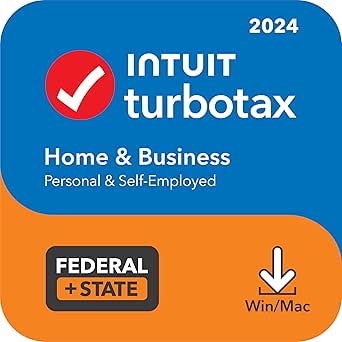 | Best Overall for Sole-Proprietor Freelancers | Tax year: 2024 | Platform: PC and Mac | Federal e-files: 5 | VIEW LATEST PRICE | See Our Full Breakdown |
| ComplyRight TaxRight 2026 Federal and State Tax Preparation Software Download Card |  | Best for High-Volume Contractor Forms | Tax year: 2026 | Format: Download card | Operating system: Windows 10 and later | VIEW LATEST PRICE | See Our Full Breakdown |
| H&R Block Deluxe Tax Software 2025 for Windows and Mac |  | Best for Freelancers With Investment or Retirement Income | Platform: Windows and Mac | Supported operating systems: Windows 10; macOS 12 Monterey | Processor: 32-bit | VIEW LATEST PRICE | See Our Full Breakdown |
| H&R Block Premium & Business Tax Software 2025 for Windows, Online Code |  | Best for Freelancers with Complex Business Returns | Tax year: 2025 | Platform: Windows | Minimum operating system: Premium: Windows 10; Business: Windows 11 | VIEW LATEST PRICE | See Our Full Breakdown |
| TurboTax Home & Business Desktop Edition 2025, Federal and State Tax Return Software |  | Best for Self-Employed Filers Who Create Business Forms | Edition: Home & Business Desktop Edition | Tax year: 2025 | Delivery: Download | VIEW LATEST PRICE | See Our Full Breakdown |
| H&R Block Premium & Business Tax Software 2021 for Windows |  | Best for Amending or Recreating a 2021 Business Return | Tax year: 2021 | Platform: Windows PC download | Included state program: One | VIEW LATEST PRICE | See Our Full Breakdown |
| ComplyRight 2026 LaserLink State and Federal Tax Preparation Software Download Card |  | Best for Printing IRS-Style Forms | Product type: Download card | Supported operating system: Windows 10 or later | Processor requirement: 2 GHz or higher | VIEW LATEST PRICE | See Our Full Breakdown |
| H&R Block Deluxe + State 2026 Tax Software for Windows and Mac |  | Best for Freelancers with Straightforward Personal Returns | Tax year: 2026 | Compatibility: Windows and Mac | Included state program: One download | VIEW LATEST PRICE | See Our Full Breakdown |
| TurboTax Home & Business 2023 (PC/Mac Download) |  | Best for Freelancers Handling Business Forms | Platform: PC and Mac download | Tax year: 2023 | Included federal e-files: 5 | VIEW LATEST PRICE | See Our Full Breakdown |
| tax filing software for freelancer | Tax year | Federal e-files |
|---|---|---|
| TurboTax Home & Business 2016 | 2016 | — |
| H&R Block Premium & Business T | — | 5 free federal e-files |
| TurboTax Home & Business 2024 | 2024 | 5 |
| ComplyRight TaxRight 2026 Fede | 2026 | — |
| H&R Block Deluxe Tax Software | — | 5 |
| H&R Block Premium & Business T | 2025 | — |
| TurboTax Home & Business Deskt | 2025 | Five included |
| H&R Block Premium & Business T | 2021 | Five free |
| ComplyRight 2026 LaserLink Sta | — | — |
| H&R Block Deluxe + State 2026 | 2026 | Five free |
| TurboTax Home & Business 2023 | 2023 | — |
More Details on Our Top Picks
TurboTax Home & Business 2016 Tax Software for PC and Mac
For a freelancer who needs to prepare a 2016 federal and state return, this TurboTax edition pairs personal filing with support for sole proprietors, self-employed workers, and single-member LLCs. Its five federal e-files can cover multiple returns, while importing 1099-B transactions is useful if investment activity sits alongside business income. The accuracy check adds a review step, but it cannot make this old tax-year edition suitable for current filings. Compared with TurboTax Home & Business 2024, this copy is limited to tax-year 2016 and installs from a CD-ROM rather than serving as a more recent filing option. I would choose it only for a historical return, and only if the computer still supports its installation media.
Pros:- Combines personal and sole-proprietor business tax preparation
- Includes five federal e-files and a state product
- Imports 1099-B stock transactions
- Checks returns for accuracy
Cons:- Covers only tax year 2016, so it is not for current filings
- Requires CD-ROM installation, which may not suit newer computers
Best for: Freelancers or sole proprietors who need to prepare an unfiled 2016 return and have a compatible PC or Mac with CD-ROM access
Not ideal for: Anyone filing a current-year return, or computer owners without a CD-ROM drive
- Tax year:2016
- Compatibility:PC and Mac
- Format:CD-ROM
- Tax coverage:Federal and state
- Included federal e-files:5
- Supported users:Sole proprietors, self-employed individuals, and single-member LLCs
- Supported forms:W-2 and 1099
Our verdict“Choose this only to prepare a 2016 return; for a more recent freelancer filing, the 2024 TurboTax Home & Business edition is a better match.”
This bundle is a stronger fit for freelancers whose tax work reaches beyond a sole-proprietor return: its business forms cover entities such as partnerships, S corporations, estates, trusts, and nonprofits, alongside individual filing. AI Tax Assist and step-by-step guidance may help users work through unfamiliar forms, while payroll and employer forms add value for owners who pay staff. Compared with TurboTax Home & Business 2024, which focuses on self-employed and small-business filing, this H&R Block option spans more business entity types. That breadth comes with setup details to check: Premium supports Windows 10 or later, but Business requires Windows 11. Only one state program download is included, so I would not pick it for someone who needs several state downloads and wants them bundled.
Pros:- Covers individual and multiple business entity return types
- Includes AI Tax Assist and step-by-step guidance
- Can import common tax forms and prior-year returns
- Includes payroll and employer form preparation
Cons:- Business download requires Windows 11, while Premium supports Windows 10 or later
- Only one state program download is included
- Its broad entity coverage may be unnecessary for a freelancer filing only as a sole proprietor
Best for: Freelancers who operate a partnership, S corporation, nonprofit, trust, or other supported entity and also need individual and payroll tax forms
Not ideal for: Mac users, Windows 10 users who need the Business download, or filers who need multiple state program downloads included
- Included downloads:Premium and Business
- Premium compatibility:Windows 10 or later
- Business compatibility:Windows 11
- Federal e-files:5 free federal e-files
- Business forms:1120, 1120S, 1065, 1041, 990, 940, 941, W-2, and 1099
- State programs:Unlimited business state programs; one state program download included
Our verdict“Pick this for a Windows-based freelancer with a separate business entity or payroll needs; solo contractors with simpler returns may prefer a more focused option such as TurboTax Home & Business 2024.”
TurboTax Home & Business 2024 Tax Software for PC and Mac
For freelancers filing business income alongside a personal return, this edition keeps the workflow focused on self-employed people, contractors, and small-business owners. Its deduction and credit search helps surface eligible business and personal tax items, while W-2 and 1099 creation is handy for owners who also pay workers or contractors. Compared with the older TurboTax Home & Business 2016, the 2024 tax-year coverage makes this the more relevant choice for a newer return; compared with H&R Block Premium & Business 2026, it is more directly aimed at sole proprietors than at a range of business entities. The tradeoffs are extra costs for state e-filing and live tax advice, plus a Mac requirement of macOS Ventura 13 or Sonoma 14.
Pros:- Targets self-employed and small-business tax needs
- Searches for personal and business deductions and credits
- Creates and e-files W-2s and 1099s
- Imports information from participating companies
Cons:- State e-file is sold separately
- Live tax advice requires an additional fee
- Mac users need macOS Ventura 13 or Sonoma 14
Best for: Freelancers, independent contractors, and sole proprietors who want personal and business deductions handled in one desktop filing workflow
Not ideal for: Mac users on older operating systems, or filers who need state e-filing or live tax advice included without an added fee
- Tax year:2024
- Platform:PC and Mac
- Federal e-files:5
- State download:1
- State e-file:Sold separately
- Mac requirement:macOS Ventura 13 or Sonoma 14
- Technical support:U.S.-based; hours may vary
- Live tax advice:Available for a fee
Our verdict“Choose this for a sole-proprietor return with business deductions and contractor forms; look to H&R Block Premium & Business 2026 if you need broader entity coverage.”
ComplyRight TaxRight 2026 Federal and State Tax Preparation Software Download Card
TaxRight serves a different freelancer need from personal tax software: it focuses on preparing, printing, and e-filing information returns such as 1099s and W-2s. Unlimited payers and recipients make it a practical fit for a small business that issues forms to many contractors, while broad form support covers common federal and state reporting paperwork. Unlike TurboTax Home & Business 2024, it is not presented as a tool for preparing an individual freelancer’s complete personal income tax return. Printing on blank or pre-printed forms offers flexibility, but the paper itself is not included. It also requires Windows 10 or later, administrator rights, internet access, and sufficiently capable hardware, so Mac users and freelancers seeking one all-in-one tax filing program should skip it.
Pros:- Handles unlimited payers and recipients
- Supports a wide range of 1099 and W-2 forms
- Supports printing and e-filing to the IRS and SSA
- Works with most Windows-compatible laser and inkjet printers
Cons:- Does not serve as a complete personal freelancer income-tax filing option
- Requires Windows 10 or later, internet access, and administrator rights
- Paper tax forms are not included
Best for: Freelancers or small businesses that issue many 1099s or W-2s and need Windows software for form preparation, printing, and e-filing
Not ideal for: Freelancers looking for personal income tax return preparation, Mac users, or businesses without administrator access and internet connectivity
- Tax year:2026
- Format:Download card
- Operating system:Windows 10 and later
- Processor:2 GHz or higher
- Memory:4 GB RAM or higher; 8 GB for e-filing
- Disk space:600 MB
- Display:1920 × 1080 resolution or higher
- Supported forms:1096, 1098, 1098-T, 1099 series, W-2, W-2C, W-2G, W-3, W-3C, 5498
- Paper forms:Not included
Our verdict“Choose TaxRight for high-volume 1099 and W-2 processing, not as a replacement for a personal tax return program like TurboTax Home & Business 2024.”
H&R Block Deluxe Tax Software 2025 for Windows and Mac
H&R Block Deluxe is aimed at a different slice of the freelance market: people with a personal return involving investments, a home sale, or retirement income, rather than owners who need dedicated business forms. Step-by-step deduction guidance, document imports, and an accuracy review can help organize a more involved individual return. Compared with TurboTax Home & Business 2024, it does not list the same self-employed focus or W-2 and 1099 creation; in exchange, it may suit a freelancer whose business paperwork is simple but whose personal finances are varied. The main limitation is that state downloads cost extra, and the software requires an internet connection and compatible printer. Check system support too: the listed operating systems are Windows 10 and macOS 12 Monterey.
Pros:- Provides step-by-step guidance for credits and deductions
- Imports common tax forms and prior-year returns
- Supports investment, home sale, and retirement income reporting
- Includes an accuracy review and audit risk assessment
Cons:- State downloads are available for an additional fee
- Requires an internet connection and compatible printer
- Does not list the dedicated self-employed and business-form features offered by TurboTax Home & Business
Best for: Freelancers whose business income is straightforward but whose personal return includes investments, a home sale, or retirement income
Not ideal for: Self-employed filers who need dedicated business return tools, or users who need an included state download
- Platform:Windows and Mac
- Supported operating systems:Windows 10; macOS 12 Monterey
- Processor:32-bit
- Available hard drive space:Windows: 1.5 GB; Mac: 150 MB
- Display requirement:1024 × 768 SVGA color monitor
- Additional requirements:Compatible inkjet or laser printer; internet connection
- Federal e-files:5
- State download:Available for an additional fee
Our verdict“Choose Deluxe when your freelance activity is simple but your personal finances need investment or retirement reporting; choose TurboTax Home & Business for more direct business tax support.”
Freelancers whose work has grown into a partnership, S corporation, or other formal entity get more coverage here than with TurboTax Home & Business Desktop Edition 2025, which focuses on self-employed filers and small business owners. This H&R Block edition handles personal returns alongside a broad range of business filings, including LLC, estate, trust, and nonprofit returns, so it can suit owners managing more than a straightforward Schedule C. Step-by-step guidance, searchable help, and AI Tax Assist add support while preparing those returns, and five federal e-files are included. The tradeoff is a more demanding setup: the Business component requires Windows 11 and 15 GB of storage, while Premium has lower requirements. An internet connection and compatible printer are also required.
Pros:- Supports personal returns and a wide range of business entity filings.
- Includes step-by-step guidance, searchable help articles, and AI Tax Assist.
- Imports common tax forms and prior-year returns.
- Includes five federal e-files and unlimited business state programs.
Cons:- The Business component requires Windows 11 and 15 GB of storage.
- Requires an internet connection and a compatible printer.
- The different system requirements for Premium and Business can complicate setup.
Best for: Freelancers whose businesses file partnership, S-corporation, LLC, estate, trust, or nonprofit returns alongside a personal return.
Not ideal for: Sole proprietors seeking a simple Windows 10-compatible setup, or Mac users, since this software is Windows-only and its Business component requires Windows 11.
- Tax year:2025
- Platform:Windows
- Minimum operating system:Premium: Windows 10; Business: Windows 11
- Processor:32-bit
- Storage requirement:Premium: 1.5 GB; Business: 15 GB
- Business returns supported:Corporate, S-corporation, partnership, LLC, estate, trust, and nonprofit
- Included state programs:Unlimited business state programs; one state program download
- Federal e-filing:Five free federal e-files
- Internet connection:Required
Our verdict“Choose this H&R Block edition if your freelance business files more than a basic sole-proprietor return and your Windows computer meets the Business requirements.”
TurboTax Home & Business Desktop Edition 2025, Federal and State Tax Return Software
For freelancers who need help with their personal return and recurring business paperwork, TurboTax Home & Business Desktop Edition 2025 brings deduction guidance together with tools for creating W-2, 1099, and K-1 forms. That form creation gives it a different emphasis from H&R Block Premium & Business Tax Software 2025, which covers a wider range of business entity returns. TurboTax instead targets self-employed individuals, contractors, sole proprietors, and consultants who want industry-specific deduction prompts, asset depreciation tools, and audit alerts in one desktop package. Five federal e-files are included. Its main drawback is the platform and filing limits: it requires Windows 11 or macOS Sonoma or later, and state e-filing is sold separately. Live tax advice also costs extra.
Pros:- Offers business-specific deduction guidance for self-employed filers.
- Includes tools to create W-2, 1099, and K-1 forms.
- Provides asset depreciation tools and audit alerts.
- Includes five federal e-files and U.S.-based technical support.
Cons:- Does not support Windows 10.
- State e-filing is sold separately.
- Live tax advice is available only for an additional fee.
Best for: Freelancers and independent contractors who need business deduction prompts and tools to prepare W-2, 1099, or K-1 forms.
Not ideal for: People using Windows 10, filers who need state e-filing included, or freelancers who need broad entity-return support beyond the product’s self-employed focus.
- Edition:Home & Business Desktop Edition
- Tax year:2025
- Delivery:Download
- Supported operating systems:Windows 11 or macOS Sonoma or later
- Federal e-files:Five included
- State e-file:One state via download; state e-file sold separately
- Tax tools:Industry-specific deductions, W-2 and 1099 forms, K-1 forms, asset depreciation, and audit alerts
- Technical support:U.S.-based; hours may vary
- Live tax advice:Available for an additional fee
Our verdict“Pick TurboTax if your freelance filing centers on self-employment deductions and business forms, and your computer runs a supported operating system.”
This older H&R Block edition is relevant to a narrow task: preparing or revisiting a 2021 tax return. It supports personal and several business return types, including corporate, partnership, LLC, estate, trust, and nonprofit filings, plus payroll and employer forms such as 940, 941, W-2, and 1099. That breadth resembles the 2025 H&R Block Premium & Business software, but the 2021 tax-year coverage makes this a poor choice for filing a current-year return. It also runs on Windows only and includes one state program, compared with the newer edition’s broader state-program provision. Step-by-step guidance and imports for common forms and prior-year returns can help with historical preparation, but buyers should match the software year to the return they need to file.
Pros:- Supports a broad range of business return types.
- Includes payroll and employer forms such as 940, 941, W-2, and 1099.
- Provides step-by-step guidance and imports common forms and prior-year returns.
- Includes five free federal e-files and one state program.
Cons:- Prepares returns for tax year 2021, not a current tax year.
- Available for Windows only.
- Includes just one state program.
Best for: Windows users preparing, correcting, or reviewing a 2021 personal or business tax return, including returns with payroll forms.
Not ideal for: Freelancers filing a current-year return, Mac users, or anyone needing more than one included state program.
- Tax year:2021
- Platform:Windows PC download
- Included state program:One
- Business return types:Corporate, S-corporation, partnership, LLC, estate, trust, and nonprofit
- Payroll and employer forms:940, 941, W-2, and 1099
- Federal e-files:Five free
Our verdict“Choose this only when you specifically need Windows software for a 2021 return; current-year filers should use a newer edition such as H&R Block Premium & Business 2025.”
ComplyRight 2026 LaserLink State and Federal Tax Preparation Software Download Card
ComplyRight LaserLink takes a form-centered approach rather than guiding a freelancer through a full personal and business return. Its forms are modeled on official IRS documents, and the software supports printing a broad range of federal forms, including 1099s and W-2s. That makes it a better fit for users focused on preparing and printing tax paperwork than TurboTax Home & Business Desktop Edition 2025, which offers self-employment deduction guidance and business tax tools. LaserLink supports access to e-filing, but the download card does not include paper forms, and a printer is central to its workflow. It requires Windows 10 or later, internet access for updates and e-filing, and a 1920 x 1080 display or higher. Freelancers seeking guided filing for their full return should look elsewhere.
Pros:- Supports printing a broad range of federal tax forms.
- Uses forms designed to mirror official IRS documents.
- Includes access to e-filing.
- Requires only 600 MB of disk space.
Cons:- Does not include paper tax forms.
- Requires Windows 10 or later and internet access for updates and e-filing.
- A compatible printer is needed, with laser printers recommended.
Best for: Windows-based freelancers or small businesses that need software for preparing and printing IRS-style federal forms such as 1099s and W-2s.
Not ideal for: Freelancers seeking guided personal-return preparation, business deduction help, or a paperless workflow; paper forms are not included.
- Product type:Download card
- Supported operating system:Windows 10 or later
- Processor requirement:2 GHz or higher
- Memory requirement:4 GB RAM or higher; 8 GB for e-filing
- Disk space:600 MB
- Display resolution:1920 x 1080 or higher
- Internet access:Required for updates and e-filing
- Printer compatibility:Most Windows-compatible printers; laser printers recommended
Our verdict“Choose LaserLink for form preparation and printing, not as a substitute for guided freelancer return software such as TurboTax Home & Business.”
H&R Block Deluxe + State 2026 Tax Software for Windows and Mac
Freelancers with investment income or itemized deductions, but without a business entity return to prepare, may find H&R Block Deluxe + State 2026 a simpler fit than the Premium & Business editions. It supports Schedule A deductions, imports common tax forms and prior-year returns, and includes an accuracy review. Those tools can make a personal return easier to organize, but the product data does not list the business-return coverage found in H&R Block Premium & Business Tax Software 2025 or the self-employed form tools in TurboTax Home & Business Desktop Edition 2025. One state program download and five federal e-files are included. That makes this a more limited choice for freelancers who need dedicated business filing support, and it is available only for Windows and Mac.
Pros:- Provides step-by-step guidance and Schedule A deduction support.
- Imports W-2, 1099, 1098, and prior-year return information.
- Includes an accuracy review.
- Provides five free federal e-files and one state program download.
Cons:- Includes only one state program download.
- Product details do not list business-entity return support.
- Limited to Windows and Mac.
Best for: Freelancers filing a relatively straightforward personal return who need Schedule A deduction support and investment-income reporting assistance.
Not ideal for: Self-employed filers who need dedicated business-return preparation, multiple state program downloads, or an operating system other than Windows or Mac.
- Tax year:2026
- Compatibility:Windows and Mac
- Included state program:One download
- Federal e-files:Five free
- Federal preparation and printing:Unlimited
- Deduction support:Schedule A
- Tax form import:W-2, 1099, 1098, and prior-year returns
- Investment income:Reporting assistance included
Our verdict“Choose Deluxe + State for a supported personal return with deductions and investment income, but select a Premium & Business or Home & Business edition for dedicated freelance business filing.”
TurboTax Home & Business 2023 (PC/Mac Download)
TurboTax Home & Business 2023 is the clearest fit here for freelancers who need more than a basic individual return. Its deduction finder searches for industry-specific deductions and credits, while asset depreciation support can help account for business equipment. The ability to create and e-file W-2s and 1099s also suits freelancers who manage payments or payroll for others, rather than only reporting their own income.
Compared with the newer TurboTax Home & Business 2024, this edition is tied to the 2023 tax year, so the year on the software must match the return being filed. It includes five federal e-files, but the state e-file is sold separately. The audit risk meter and free U.S.-based support add guidance, though support hours may vary. Freelancers with no business forms to prepare may find these tools unnecessary.
Pros:- Designed for self-employed and small business tax situations
- Deduction finder searches for industry-specific deductions and credits
- Supports creation and e-filing of W-2s and 1099s
- Includes asset depreciation tools and free U.S.-based product support
Cons:- State filing is sold separately despite one state e-file being listed as included
- Support hours may vary, which can limit access when questions arise
- Its 2023 tax-year focus makes it unsuitable for filing returns for other years
Best for: Freelancers and small business owners filing a 2023 return who need deduction guidance, depreciation support, or W-2 and 1099 preparation.
Not ideal for: People filing a return for a different tax year, freelancers with only simple income and expenses, or buyers who need state e-filing included.
- Platform:PC and Mac download
- Tax year:2023
- Included federal e-files:5
- Included state e-file:1; state filing sold separately
- Support:Free U.S.-based product support; hours may vary
- Business forms:Create and e-file W-2s and 1099s
- Deduction support:Industry-specific deduction finder
- Other features:Asset depreciation and audit risk meter
Our verdict“Choose this edition for a 2023 freelancer return that needs business deductions and form preparation, but check the tax year and plan separately for state filing.”

How We Picked
I ranked these options around the decisions that matter most to freelancers: whether the product is positioned for business income, which tax year it covers, what operating systems or delivery formats it lists, and whether federal and state preparation are part of the product description. A freelancer’s filing needs can extend beyond a standard wage-and-salary return, so products labeled Home & Business or Premium & Business receive more weight for this audience than editions labeled Deluxe alone.
The order gives priority to a clear fit for self-employed filing and a recent edition, then distinguishes choices by platform and stated scope. Older releases rank lower for anyone preparing a current return because their year may not match the filing task. Product names alone cannot confirm every supported form, state, or device, so I treat those details as verification points rather than making assumptions; buyers should check the edition information before purchase.
Factors to Consider When Choosing Tax Filing Software For Freelancers
For freelancers, choosing tax software is less about brand familiarity and more about matching the edition to the return you need to file. I would check these factors before choosing between business-focused software, a general-purpose edition, or a tax-preparation download.
Match the Software Year to the Return You Are Filing
Tax software editions are tied to particular filing years, and an edition marked 2025 or 2026 does not automatically mean it prepares the return you need today. Check the tax year printed on the product and confirm which return period it covers before buying. This roundup includes editions from 2016, 2021, 2023, 2024, 2025, and 2026, so year mismatch is a real risk rather than a minor detail. An older release may make sense only when you are completing or correcting a return for that older period and the product supports that task. Do not choose by the newest-looking name alone; confirm the tax year and relevant form support on the seller’s product details.
Choose an Edition That Fits Self-Employment Income
Freelance income can require forms and business-related questions that a package designed around ordinary household tax filing may not address. Look for clear language about self-employment, business income, or Schedule C support rather than assuming that a familiar tax brand includes it in every edition. The lineup includes Home & Business and Premium & Business products alongside Deluxe editions, which signals an important distinction to investigate. A Deluxe label may suit a simpler return, but it should not be treated as interchangeable with a business-focused package. Before purchase, compare the listed forms with how you earn income and the type of business activity you report.
Check Operating System and Delivery Format Before Buying
A product can fit your tax situation and still fail to fit your computer or preferred workflow. This list includes Windows-only software, PC and Mac editions, downloads, and a download card, so confirm both compatibility and how access is delivered. Check current operating-system requirements rather than relying on a product title that mentions Windows or Mac. If you work across more than one device, verify whether the software is installed locally or accessed another way, and whether your intended device is supported. Buyers who skip this step may end up with a product they cannot install even though its tax features appear suitable.
Confirm State Filing Coverage Separately
A product name that mentions federal and state preparation does not answer every question about the state return you need. Check whether your state is supported, whether the state component is included or must be obtained separately, and whether it matches the software edition. This matters especially if you moved during the year, earned income across state lines, or have a filing obligation outside your home state. A federal return may be only part of your tax workload, so compare the full filing scope before deciding that a package covers everything. When the listing is unclear, verify the details with the manufacturer or seller before purchase.
Think About Recordkeeping Before You Start Filing
Tax software can guide data entry, but it cannot replace organized records of income, expenses, and supporting documents. Gather invoices, payment records, business expenses, and any relevant tax forms before choosing a workflow. A package with a business-oriented label may help structure the filing process, but it does not determine whether an expense qualifies or resolve missing documentation. New freelancers often focus on entering income and overlook the time needed to categorize expenses consistently. If your records are complex or you are unsure how an item should be reported, consider getting qualified tax advice rather than relying on software prompts alone.
Pay for Scope You Will Actually Use
A broader business-focused edition may be a better fit when you report self-employment income, but extra features offer little value if your return is simple and the product does not match your filing year. Conversely, choosing a basic edition solely because the title sounds familiar can leave you without support for forms your return needs. Compare the stated form coverage, state options, and platform support with your actual situation instead of treating a larger package as automatically better. For a straightforward sole-proprietor return, prioritize confirmed support for your business income and filing year. If you have multiple businesses, complex state obligations, or unusual income, check whether the software covers those needs or whether professional help is a better choice.
Frequently Asked Questions
Can I use an older edition to file my current freelancer tax return?
Do not assume that an older edition can prepare a current-year return. The products in this roundup span many tax years, and the edition year needs to match the return you are preparing. An older release may be relevant for completing a return for its own tax year, but it may lack current forms or tax-law updates for a newer filing period. Check the manufacturer’s supported tax year and forms before purchasing. If the listing does not make that clear, confirm with the seller rather than relying on the product title alone.
Is an H&R Block Deluxe edition enough for freelance income?
The word Deluxe alone does not confirm that a product supports all the business forms a freelancer needs. This lineup separates Deluxe products from H&R Block’s Premium & Business editions, so compare their form coverage rather than treating the names as equivalent. Check specifically for support for your type of self-employment income and any business schedules required for your return. Also verify the tax year and state coverage. If the product details do not clearly confirm those points, a business-labeled edition may be the safer option to investigate.
Which should I check first: tax-year support or Mac and Windows compatibility?
Check both before buying, because either mismatch can make the software unusable for your task. Start with the tax year: a compatible program is no help if it cannot prepare the return period you need. Then verify your operating system, device requirements, and delivery format; this list includes Windows-only products as well as PC and Mac options. Confirm state coverage too if you need a state return. Reading the product details in that order helps prevent a purchase based on the brand name or platform label alone.
Do the ComplyRight products fit the same needs as TurboTax Home & Business?
Not necessarily; compare their stated scope rather than assuming that every tax-preparation product follows the same workflow or covers the same forms. TurboTax Home & Business is clearly labeled for a home-and-business use case, while the ComplyRight listings identify federal and state preparation software. Those descriptions do not by themselves confirm identical freelancer form support, state availability, or ease of use. Review each product’s supported forms and tax year against your filing situation. If you rely on a particular business schedule, confirm its support before choosing between them.
When should a freelancer choose tax software versus a tax professional?
Software may fit a return you understand and can support with complete records, while a professional may be a better fit when your filing situation is unusual or difficult to interpret. Examples include activity in multiple states, complex business structures, major changes in how you earn income, or uncertainty about how to report an expense. The software can organize information and prepare forms, but it cannot replace judgment about facts that require tax expertise. A freelancer can also use software for a straightforward return and seek professional advice for a specific question. Decide based on the complexity and confidence of your filing, not just the product label.
Conclusion
Best overall: I would start with TurboTax Home & Business 2025 for a freelancer seeking a business-oriented option, after confirming the tax year and device requirements. Best value: compare the listed H&R Block Premium & Business 2025 with the 2026 edition and choose only the one that matches your filing year and platform; the older edition is not a value if it cannot handle your current return. Best for beginners: H&R Block’s business-labeled package is a reasonable candidate to investigate when you want a familiar guided filing workflow, but verify its forms before buying. Best premium fit: TurboTax Home & Business is the strongest match in this lineup for someone who wants a clearly business-oriented product. Best for specific needs: consider ComplyRight TaxRight or LaserLink if their federal, state, and form coverage matches your filing task. In every case, let the tax year, supported forms, state coverage, and computer compatibility make the final decision.