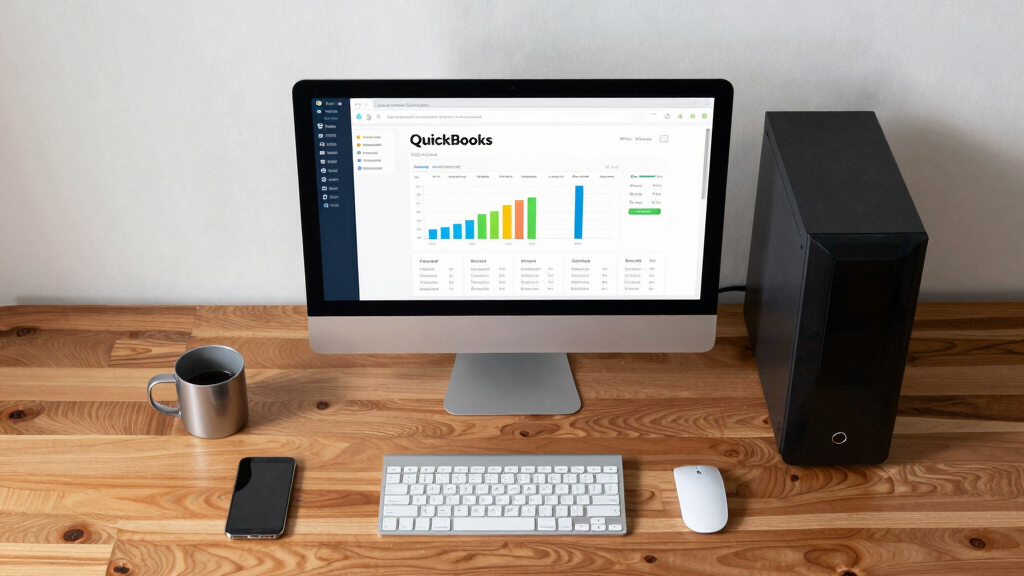

Choosing the right desktop PC for QuickBooks and spreadsheets means balancing raw performance, expandability, and reliability. For most users, a machine with a fast processor, ample RAM, and solid storage is essential. The Dell OptiPlex 7070 SFF stands out for its powerful CPU and large memory capacity, ideal for heavy multitasking. Meanwhile, the HP ProDesk 600 offers a compact design with a capable i5 processor for those prioritizing space and efficiency. The Dell Slim Desktop introduces a modern, sleek option with a focus on security and multiple monitor support. Each has tradeoffs, like upgrade limitations in smaller form factors or less robust graphics, so knowing your needs helps narrow the choice.

Get smart everyday buys delivered free with Prime
- Fast, free delivery on millions of items
- Prime Video, Amazon Music and more included
- Member-only deals all year
Key Takeaways
- The Dell OptiPlex 7070 SFF delivers outstanding multitasking with an i7 processor and 32GB RAM, making it best for heavy-duty spreadsheet work.
- The HP ProDesk 600 offers a compact footprint suitable for tight spaces, with a balanced i5 CPU and 16GB RAM for everyday productivity.
- The Dell Slim Desktop combines sleek design and security features, ideal for users with multiple monitor setups and space constraints.
- All options differ in expandability; smaller form factors may limit future upgrades, especially for graphics or additional RAM.
- Budget considerations are important, as premium features like multiple monitor support or higher storage capacity may increase costs.



| desktop PC for quickbooks and spreadsheet | Processor | Storage | Operating System | RAM |
|---|---|---|---|---|
| Dell OptiPlex 7070 SFF Desktop | Intel Core i7-9700 8-core up to 4.70GHz | 1TB NVMe M.2 SSD | Windows 11 Pro | 32GB DDR4 |
| Dell Optiplex 7060 SFF Desktop | Intel 8th Gen i7-8700 (6 Core) | 512GB NVMe M.2 SSD | Windows 11 Pro | 32GB DDR4 |
| Dell Optiplex 7050 SFF Desktop | Intel i7-7700 3.60 GHz | 1TB SSD | Windows 11 Pro | 32GB DDR4 |
| HP ProDesk 600 Desktop Compute | Intel 6-Core i5 (2.90GHz up to 4.30GHz) | 256GB PCIe NVMe SSD | Windows 11 Pro | 16GB DDR4 |
| Dell Slim Desktop with Intel C | Intel Core Ultra 5-225 | 512GB SSD | Windows 11 Home | — |
More Details on Our Top Picks
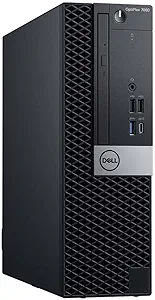
Dell OptiPlex 7070 SFF Desktop Computer PC, Intel Core i7-9700, 32GB RAM, 1TB NVMe SSD, Windows 11 Pro, Wireless Keyboard & Mouse
The Dell OptiPlex 7070 SFF offers a powerful 8-core Intel Core i7-9700 processor paired with 32GB of RAM, making it a top choice for demanding spreadsheet work and QuickBooks databases. Its 1TB NVMe SSD ensures fast startup and file access, reducing waiting times during busy work sessions. Compared with smaller or less robust options, this model provides more expandability, although its small form factor might limit future upgrades. It’s ideal for users who need serious processing power and don’t mind a desktop that’s slightly less upgrade-friendly.
Pros:- Powerful 8-core processor for multitasking
- Large 32GB RAM supports heavy spreadsheet and database work
- Fast 1TB NVMe SSD for quick boot and data access
- Pre-installed with Windows 11 Pro
Cons:- Small form factor may restrict future upgrades
- Renewed status could limit warranty coverage
- No dedicated graphics card, limiting graphics-intensive tasks
Best for: Power users handling large spreadsheets and multiple QuickBooks files simultaneously.
Not ideal for: Users who prioritize a small, space-saving design or plan frequent hardware upgrades.
- Processor:Intel Core i7-9700 8-core up to 4.70GHz
- RAM:32GB DDR4
- Storage:1TB NVMe M.2 SSD
- Operating System:Windows 11 Pro
- Wireless:Built-in WiFi 6E
- Ports:5 x USB 3.1, 4 x USB 2.0, 2 x DisplayPort
Our verdict“This model is best suited for those who need serious processing and multitasking power without much concern for upgrade flexibility.”
Dell Optiplex 7060 SFF Desktop Computer PC with Intel i7-8700, 32GB RAM, 512GB SSD, Windows 11 Pro, Wireless Keyboard & Mouse
The Dell Optiplex 7060 SFF features an 8th Gen Intel i7-8700 with 6 cores, paired with 32GB of RAM and a 512GB NVMe SSD. While slightly less powerful than the 7070, it still handles multitasking and large spreadsheets with ease. Its multiple connectivity options and included peripherals make it a flexible choice for office environments. The main tradeoff is its smaller storage capacity, which can be supplemented with external drives or upgrades. Compared to the 7070, this model offers room for future expansion, particularly in adding more storage or RAM, making it suitable for users who want a balance of performance and upgrade potential.
Pros:- Efficient 8th Gen i7 CPU with 6 cores
- Large 32GB RAM ideal for multitasking
- Includes Windows 11 Pro and peripherals
- Room for future upgrades
Cons:- Limited storage out of the box (512GB SSD)
- Small form factor might restrict some upgrades
- Renewed condition could have minor cosmetic issues
Best for: Users seeking a versatile machine with room to grow and robust multitasking capabilities.
Not ideal for: Those seeking the absolute latest processor or maximum storage capacity without upgrades.
- Processor:Intel 8th Gen i7-8700 (6 Core)
- RAM:32GB DDR4
- Storage:512GB NVMe M.2 SSD
- Operating System:Windows 11 Pro
- WiFi:Built-in
- Ports:5 USB 3.0, 2 USB 2.0, 2 DisplayPort
Our verdict“A solid choice for users who want a dependable, expandable desktop for spreadsheet and QuickBooks tasks.”
Dell Optiplex 7050 SFF Desktop PC with Intel i7-7700, 32GB RAM, 1TB SSD, Windows 11 Pro
The Dell Optiplex 7050 with an Intel i7-7700 processor and 32GB of RAM offers dependable performance for daily spreadsheet work and QuickBooks. Its 1TB SSD ensures ample fast storage, and Windows 11 Pro pre-installed adds enterprise features for enhanced security and management. Being a professionally renewed device, it balances cost and reliability, though its older processor might lag slightly behind newer models in raw speed. It’s a practical choice for those who want proven stability and don’t need the latest hardware.
Pros:- Trusted i7-7700 processor with 32GB RAM
- 1TB fast SSD for quick data access
- Reliable, professionally renewed condition
- Includes Windows 11 Pro and essential ports
Cons:- Older processor may be less future-proof
- Limited upgrade options due to form factor
- Renewed condition might vary
Best for: Small business users needing reliable, steady performance without high upgrade demands.
Not ideal for: Power users requiring the latest CPU or the highest possible storage capacity.
- Processor:Intel i7-7700 3.60 GHz
- RAM:32GB DDR4
- Storage:1TB SSD
- Operating System:Windows 11 Pro
- Ports:USB 3.0/2.0, HDMI, DisplayPort, Ethernet, Audio I/O
Our verdict“A dependable, cost-effective option for users prioritizing stability over raw cutting-edge performance.”
HP ProDesk 600 Desktop Computer, Intel Core i5, 16GB DDR4 RAM, 256GB SSD
The HP ProDesk 600 provides a smaller footprint with a capable 6-core Intel i5 processor, 16GB RAM, and a 256GB PCIe NVMe SSD. It’s well-suited for daily spreadsheet work and QuickBooks, especially in environments where desk space is limited. Its enterprise-grade features and Windows 11 Pro make it reliable for professional use. The main drawback is its limited graphics performance, which isn’t ideal for graphics-heavy tasks but is sufficient for productivity applications. Its compact size and solid specs make it a good choice for users who need efficiency in a tight space.
Pros:- Efficient 6-core i5 processor
- Compact design saves space
- Fast 256GB SSD for quick operations
- Includes Windows 11 Pro
Cons:- Limited graphics capabilities
- No dedicated GPU for graphics-intensive tasks
- Basic peripherals may need upgrades
Best for: Users with limited desk space seeking a reliable, space-efficient desktop.
Not ideal for: Those needing high-end graphics or extensive future upgrade options.
- Processor:Intel 6-Core i5 (2.90GHz up to 4.30GHz)
- RAM:16GB DDR4
- Storage:256GB PCIe NVMe SSD
- Graphics:GeForce 2GB
- Operating System:Windows 11 Pro
- Dimensions:15.5 x 30.3 x 33.7 cm
Our verdict“A practical, space-saving desktop that handles everyday productivity tasks well, with some limitations in graphics potential.”
Dell Slim Desktop with Intel Core Ultra 5-225, 512GB SSD, Windows 11 Home
The Dell Slim Desktop features an Intel Core Ultra 5-225 processor, 512GB SSD, and Windows 11 Home, offering a sleek, modern look. Its support for multiple monitor setups and tool-less upgrade access make it suitable for multitasking environments where space and aesthetics matter. The security features, including a hardware TPM chip and 1-year onsite service, add peace of mind. Its main tradeoff is limited information on graphics capabilities, which may be a concern for users needing more graphics power, but for spreadsheet and QuickBooks tasks, it’s capable enough.
Pros:- Supports multiple monitors for increased productivity
- Sleek, stylish design from recycled materials
- Easy to upgrade with tool-less access
- Security features like TPM chip
Cons:- Limited details on graphics capabilities
- Potentially higher price for premium features
- Unclear RAM specifications
Best for: Home office users or small businesses valuing design and multi-monitor support.
Not ideal for: Heavy graphics work or users requiring maximum upgrade flexibility.
- Processor:Intel Core Ultra 5-225
- Storage:512GB SSD
- Operating System:Windows 11 Home
- Supports multiple monitors:Yes
- Security:Hardware TPM security chip
- Service:1 Year Onsite Service
Our verdict“A modern, space-efficient choice ideal for multitasking and small workspace setups, with some uncertainty around graphics performance.”

How We Picked
Our selection process prioritized machines that excel at handling QuickBooks, spreadsheets, and multitasking without unnecessary extras. We focused on CPUs with good single-core and multi-core performance, as these directly impact spreadsheet calculations and database management. RAM capacity was critical, with 16GB as a baseline and 32GB preferred for larger datasets. Storage speed mattered too—NVMe SSDs provide faster boot times and file access. We considered form factor, upgrade potential, and connectivity options, balancing performance with value. Finally, reliability, warranty, and user reviews helped refine the picks to ensure they suit small business and home office environments.
| desktop PC for quickbooks and spreadsheet | Processor | Operating System |
|---|---|---|
| Dell OptiPlex 7070 SFF Desktop | Intel Core i7-9700 8-core up to 4.70GHz | Windows 11 Pro |
| Dell Optiplex 7060 SFF Desktop | Intel 8th Gen i7-8700 (6 Core) | Windows 11 Pro |
| Dell Optiplex 7050 SFF Desktop | Intel i7-7700 3.60 GHz | Windows 11 Pro |
| HP ProDesk 600 Desktop Compute | Intel 6-Core i5 (2.90GHz up to 4.30GHz) | Windows 11 Pro |
| Dell Slim Desktop with Intel C | Intel Core Ultra 5-225 | Windows 11 Home |
Factors to Consider When Choosing Best Desktop PC For Quickbooks And Spreadsheets
When selecting a desktop PC for QuickBooks and spreadsheets, focus on processors that can handle multitasking with ease, ample RAM for large datasets, and fast storage for quick access. Expandability can be beneficial but often comes second to core performance. Consider the space available—small form factors save desk space but may limit future upgrades. Price is also a factor, but investing in a reliable, capable machine can save time and frustration over the long run.Processor and RAM
A strong processor, like an Intel Core i7 or better, ensures smooth calculations and multitasking. Paired with at least 16GB of RAM, you can comfortably run multiple spreadsheets or QuickBooks files without slowdowns. For larger datasets or more demanding tasks, 32GB offers a noticeable performance boost, especially with multitasking across several applications.
Storage and Speed
Fast storage, particularly NVMe SSDs, significantly reduces wait times when opening files or launching applications. A 512GB or larger SSD is recommended, especially if you store large files locally. For most spreadsheet and accounting tasks, storage capacity is less critical than speed, but having ample space helps prevent clutter and maintains system responsiveness.
Form Factor and Expandability
Small form factor desktops save space but often restrict future upgrades, especially regarding graphics cards or additional RAM. Larger towers provide more room and flexibility, which can be a worthwhile investment if you anticipate expanding your setup or upgrading components over time. Balance space constraints with your long-term needs when making a choice.
Connectivity and Peripherals
Multiple USB ports, display outputs, and reliable WiFi are essential for connecting peripherals, printers, and network resources. If you use multiple monitors, ensure the PC supports this with compatible video outputs. Pre-installed Windows 11 Pro offers enhanced security and management features, beneficial for business users.
Price and Value
While premium specs come at a higher cost, they often translate into smoother, more reliable performance, especially under heavy multitasking. Budget models may suffice for light spreadsheet work but could struggle with larger files or more intensive database operations. Aim for a balance between cost and core performance features to maximize value.
Frequently Asked Questions
What processor is best for QuickBooks and spreadsheets?
A processor with strong single-core and multi-core performance, such as an Intel Core i7 or higher, is ideal. These CPUs handle calculations efficiently and support multitasking, ensuring your spreadsheets and QuickBooks files run smoothly without lag.
How much RAM do I need for large spreadsheets?
At least 16GB of RAM is recommended for most users, but 32GB provides extra headroom for very large datasets or running multiple applications simultaneously. Adequate RAM prevents slowdowns and improves overall responsiveness during intensive tasks.
Is SSD storage necessary for QuickBooks and spreadsheets?
Yes, an NVMe SSD greatly improves load times and file access speeds, making your workflow more efficient. A 512GB SSD strikes a good balance, providing enough space for files and applications while maintaining high performance.
Should I prioritize size or upgrade options in my desktop?
If space is limited, a smaller form factor like a mini or SFF desktop is suitable. However, if you anticipate upgrading components later, a larger tower provides more room for future hardware expansions, which can extend the device’s lifespan.
Are renewals or refurbished desktops reliable?
Refurbished and renewed desktops can be dependable if sourced from reputable vendors. They often undergo testing and repairs to meet quality standards, offering a cost-effective alternative to new hardware. However, verify warranty and return policies for peace of mind.
Conclusion
For users handling large datasets or running multiple productivity applications, the Dell OptiPlex 7070 SFF provides unmatched power and expandability. Those with space constraints or lighter workloads will find the HP ProDesk 600 or Dell Slim Desktop better suited, offering good performance in compact designs. Budget-conscious buyers or those seeking proven reliability might prefer the Dell Optiplex 7050 or refurbished options, balancing cost with dependable performance. Ultimately, your choice depends on your specific needs for processing power, space, and future growth potential.