A VPN router is a crucial security tool for tax pros and remote bookkeepers, encrypting your internet connection to protect sensitive client information from cyber threats. It creates a secure, encrypted tunnel for all your online activities, safeguarding data sent to cloud-based systems and client files. This means you don’t need to configure each device separately, ensuring consistent protection everywhere you work. Keep going, and you’ll discover how this can transform your remote workflow and boost client confidence.
Key Takeaways
- VPN routers create a secure, encrypted connection for all devices, protecting sensitive client data during remote work.
- They simplify security management by encrypting internet traffic at the network level, eliminating individual device setup.
- VPN routers safeguard data on unsecured networks like coffee shops or client offices, reducing cyber threat risks.
- Advanced features include security dashboards and access controls, enhancing data protection and compliance.
- Using a VPN router boosts client trust by ensuring consistent, reliable security for remote tax and bookkeeping tasks.

If you’re a tax professional or remote bookkeeper, safeguarding your clients’ sensitive data is essential, especially when working outside a secure office environment. One way to do this is by using a VPN router, which acts as a secure gateway for all your internet activities. These devices are designed to enhance cloud security by establishing a secure, encrypted connection between your location and the internet. When you connect through a VPN router, your data is protected from prying eyes, whether you’re accessing cloud-based accounting systems or transmitting confidential client information. Data encryption is at the heart of this security, transforming your data into an unreadable format that only authorized parties can decode, making it nearly impossible for hackers to intercept sensitive information during transmission.
Setting up a VPN router is straightforward, but understanding its role in your security framework is critical. When you connect your devices to a VPN router, all traffic is automatically encrypted and routed through a secure tunnel to a remote server. This means that even if you’re working from a coffee shop or a client’s office, your connection remains private and protected. It eliminates the risk of unsecured Wi-Fi networks exposing your data, which is a common threat for remote professionals. Plus, with a VPN router, you don’t have to configure each device individually; the security is built into the network layer, providing consistent protection across all your devices. Ensuring network security is maintained at all levels helps protect your entire workflow from potential breaches. Additionally, understanding data encryption and how it safeguards your information is essential for recognizing the importance of these devices in protecting sensitive data. Incorporating secure network protocols further enhances your defenses against cyber threats.
Connecting devices to a VPN router ensures automatic, encrypted protection across all your networks and devices.
Moreover, many VPN routers come with advanced features tailored for remote work, such as multi-device support and easy management dashboards. These tools allow you to monitor your connection’s security status, guaranteeing your data remains encrypted at all times. You can also implement specific security policies, controlling who can access what and when. This is especially useful when collaborating with team members or working with third-party apps that handle sensitive financial data. By investing in a reliable VPN router, you’re actively reducing the risk of data breaches and helping guarantee compliance with data protection regulations. Furthermore, understanding the role of encryption in data security can help you appreciate how these tools protect your work and client information.
In essence, a VPN router becomes a cornerstone of your cybersecurity setup. It simplifies the process of maintaining cloud security and guarantees that data encryption is always active. For tax pros and remote bookkeepers handling sensitive client information, this device provides peace of mind, knowing that your network is fortified against potential threats. Additionally, understanding nail biology and how to care for your nails can be a helpful reminder to maintain overall health and hygiene, which is equally important for professionals working in high-stakes environments. It’s an essential tool that helps you focus on your work without constantly worrying about the security of your data, empowering you to serve your clients confidently and securely from anywhere.
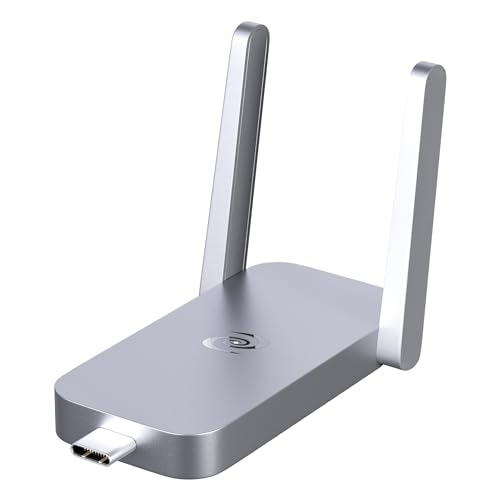
Deeper Connect Air Portable WiFi Wireless Router Hotspot Device, Lifetime Free Router VPN for Travel Privacy, Compact VPN Routers for Home and Remote Work
- Lifetime Private Browsing: Built-in decentralized VPN for privacy
- Light Daily Connectivity: Low-overhead mode for light browsing
- Optimized Pocket Router: Supports 1-3 devices with reliable connection
As an affiliate, we earn on qualifying purchases.
As an affiliate, we earn on qualifying purchases.
Frequently Asked Questions
Can VPN Routers Improve Internet Speed for Remote Work?
VPN routers can sometimes improve your internet speed for remote work by providing strong connection stability, especially when using reliable encryption protocols. While they primarily enhance security, a well-configured VPN router can reduce lag and prevent disconnections, making your connection more consistent. However, if the VPN server is slow or overloaded, it might slow down your speed. So, choosing a good VPN router with robust encryption is key to better performance.
Are VPN Routers Compatible With All Internet Service Providers?
Think of VPN routers like universal adapters—they generally work with most internet service providers (ISPs), but compatibility isn’t guaranteed. You need to check if your ISP supports encryption protocols used by the VPN router. Firmware updates are essential—they keep your device running smoothly and compatible with your ISP’s requirements. Always verify your ISP’s specifications and make sure your VPN router’s firmware is up-to-date for seamless connectivity.
How Do VPN Routers Handle Multiple Device Connections?
VPN routers handle multiple device connections seamlessly by creating a secure, encrypted network for all devices. They prioritize device security, ensuring each connection remains protected from threats. As your needs grow, VPN routers support network scalability, allowing you to add more devices without sacrificing speed or security. This setup enables your team to work confidently, knowing their data stays safe while maintaining efficient access across your entire network.
What Is the Cost Difference Between Standard and VPN Routers?
The cost difference between standard and VPN routers varies widely, with VPN routers generally costing more due to enhanced features like advanced encryption protocols and secure firmware updates. You can expect to pay a premium for VPN routers—anywhere from $50 to several hundred dollars—because they prioritize privacy and protection. While standard routers might save you money upfront, VPN routers offer added security, making the investment worthwhile for sensitive work.
Do VPN Routers Require Technical Expertise to Set Up?
VPN routers typically don’t require extensive technical expertise to set up, especially with user-friendly models. You’ll need to configure encryption protocols and adjust router configurations, but many devices come with step-by-step guides or app-based setup processes. While some familiarity with networking helps, most users can manage the setup by following instructions, making VPN routers accessible even if you’re not a tech expert.
Conclusion
Now that you understand how VPN routers work, you’re better equipped to safeguard sensitive client data and work securely from anywhere. Think of it as having a secret passage—your connection stays protected, no matter where you are. With VPN routers in your toolkit, you can confidently navigate the digital landscape without worrying about prying eyes. Remember, a stitch in time saves nine—investing in security now pays off in peace of mind later.