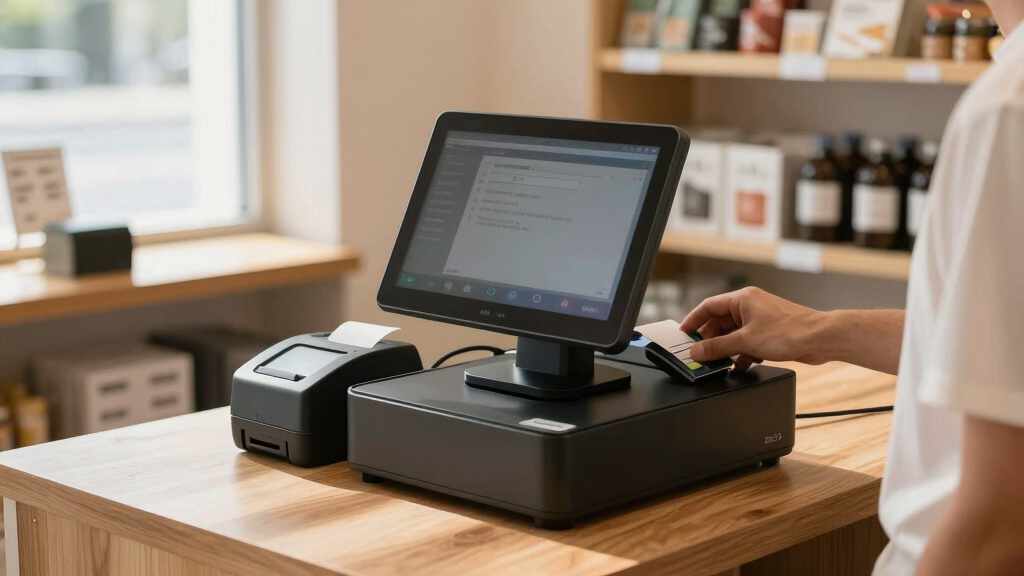

Finding the best cash register POS bundle for small business involves balancing performance, ease of use, and cost. The All-in-One SmartPOS-129 stands out as the top overall choice thanks to its comprehensive features and reliability. For those seeking affordability, the POS Cash Register 15” Touch Screen offers a solid balance of functionality and price. Meanwhile, the SmartPOS NX2 provides advanced connectivity and flexibility for growing operations. Buyers must consider factors like hardware robustness, software compatibility, and scalability, which often involve tough tradeoffs. Keep reading to see how these options compare and which might be the best fit for your business.

Get smart everyday buys delivered free with Prime
- Fast, free delivery on millions of items
- Prime Video, Amazon Music and more included
- Member-only deals all year
Key Takeaways
- The top-ranked options combine durability with user-friendly interfaces, making daily operations smoother.
- Connectivity features like WiFi and barcode scanners are common among the best picks, supporting future growth.
- Pricing varies widely, but investing in a slightly more expensive system often yields better long-term value.
- Compatibility with existing hardware and software ecosystems significantly impacts setup ease.
- Tradeoffs between advanced features and simplicity should guide your choice based on your business size and complexity.


More Details on Our Top Picks
All-in-One SmartPOS-129 Professional Cash Register for Small Business, POS Bundle with Touch Screen Monitor, Customer Display, Cash Drawer, Thermal Printer, 2D Barcode Scanner
The SmartPOS 129 stands out for its comprehensive all-in-one design, combining a large 15-inch touchscreen with multiple peripherals, making it ideal for small businesses seeking an integrated solution. Compared with the POS Cash Register 15” Touch Screen, it offers a more complete setup with a built-in scanner and customer display, reducing the need for additional hardware. However, its weight (over 53 pounds) could complicate setup or repositioning. The system’s support for various card processors and the included free setup and mobile app make it a flexible choice for businesses prioritizing ease of use and future scalability. Yet, limited info on software updates and reliance on peripherals might be a concern for long-term software management. Overall, this pick makes the most sense for small retail shops or cafes wanting a turnkey POS with minimal fuss.
Pros:- All-in-one system with touchscreen, scanner, and customer display included
- No hidden fees or forced subscriptions, ready out of the box
- Supports extensive card processor integrations for flexibility
- Includes free setup assistance and mobile app management
Cons:- Heavy at 53.9 pounds, potentially difficult to move or install
- Limited information on ongoing software updates and support
Best for: Small retail stores or cafes that want an all-in-one, ready-to-go POS system with minimal setup.
Not ideal for: Businesses expecting frequent hardware upgrades or needing lightweight, portable solutions.
- Product Dimensions:21 x 22 x 35 inches
- Item Weight:53.9 pounds
- Batteries:1 Lithium Ion batteries required (included)
Our verdict“This system is perfect for small businesses that need a comprehensive, easy-to-deploy POS without extra hardware fuss.”
POS Cash Register 15” Touch Screen Windows PC with Built-in Thermal Receipt Printer for Retail Businesses
This POS system offers a large 15-inch Windows-powered touch screen combined with an 11.6-inch customer display and a built-in thermal printer, making it suitable for small retail outlets that prioritize a familiar software environment. Compared with the All-in-One SmartPOS-129, it provides more processing power via an Intel Celeron I5 and 8GB RAM, supporting complex retail management tasks without monthly fees. However, its reliance on Windows means ongoing updates and potential security concerns, and the 90-day warranty is shorter than some competitors. Its support for extensive retail functions makes it better suited for stores with more demanding inventory or sales tracking needs. The limited wireless connectivity options and short warranty window are notable tradeoffs. Overall, this pick is ideal for tech-savvy retailers who want a flexible and powerful Windows-based POS without subscription costs.
Pros:- Large 15-inch touch screen for easy operation
- Built-in thermal receipt printer reduces setup steps
- Supports comprehensive retail management functions
- Runs on Windows, enabling flexible software choices
Cons:- Limited to small business use, not designed for large enterprises
- No mention of wireless connectivity options
- 90-day hardware warranty may be short for some users
Best for: Retail businesses that need robust Windows software support and high processing power.
Not ideal for: Small shops or casual businesses that prefer simpler, more portable POS solutions or need longer warranty coverage.
- Display:15-inch touch screen
- Customer Display:11.6-inch
- Printer:Built-in 2 1/4-inch thermal receipt printer
- Processor:Intel Celeron I5
- RAM:8GB
- Storage:128GB SSD
- Operating System:Windows
- Warranty:90 days hardware warranty
Our verdict“This system makes sense for small retail stores that want a powerful, Windows-based POS with no ongoing subscription fees.”
System with Cash Register and Receipt Printer – Compatible with 9.7″–10.2″ iPads – All-in-One Retail or Restaurant POS
This iPad-compatible POS bundle is designed for small businesses that value sleekness and simplicity. With a white stand, thermal printer, and cash drawer, it offers a modern, minimalistic look that elevates checkout areas. Compared to the All-in-One SmartPOS-129, it is more portable and space-efficient, but it requires an additional iPad (not included) and a monthly subscription for the Datio POS app to unlock full features like inventory management. The plug-and-play hardware simplifies setup, making it ideal for fast-paced environments like cafes or boutiques. However, reliance on an external device and subscription fee may deter users seeking a standalone system or one with no ongoing costs. The system’s style and ease of use make it best suited for businesses with straightforward needs and a preference for a modern aesthetic.
Pros:- Sleek, modern design enhances checkout aesthetic
- Easy to set up with plug-and-play hardware
- Compatible with iPads from 9.7″ to 10.2″ for added flexibility
- Includes thermal printer and secure cash drawer
Cons:- Requires an external iPad (not included), adding to total cost
- Dependent on subscription for full POS features
- Limited to small or medium-paced businesses
Best for: Small retail shops or cafes that want a stylish, space-saving POS with optional advanced features via subscription.
Not ideal for: Businesses that prefer a fully integrated system with no additional subscription or those needing extensive hardware upgrades.
- Compatible Devices:Apple iPad (9.7″-10.2″)
- Dimensions:16 x 16 x 10 inches
- Materials:Plastic enclosure
Our verdict“This bundle is ideal for style-conscious small businesses seeking a compact, attractive POS with optional advanced features through subscription.”
Royal Electronic Cash Register, 2000ML, Advanced POS System for Retail & Small Businesses (Refurbished)
The Royal Electronic Cash Register offers a dependable, budget-friendly option for small retail or food service operations. Its refurbished status provides a cost-effective alternative to brand-new systems, with a 1-year warranty adding peace of mind. The LCD display and support for multiple payment types make it straightforward for daily transactions. Compared with more modern, feature-rich options like the All-in-One SmartPOS-129, it has fewer advanced features but excels in simplicity and reliability. The limited details on its inventory or management capabilities suggest it’s best for basic checkout needs. While refurbished units can vary in condition, this model’s warranty and user-friendly interface make it a practical choice for tight budgets and straightforward operations.
Pros:- Refurbished units are cost-effective with a 1-year warranty
- Clear LCD display simplifies operation
- Supports multiple payment methods including mobile payments
- Simple, straightforward setup for small operations
Cons:- Limited details on advanced features or software integration
- Refurbished condition might vary, affecting longevity
Best for: Small retail or food service businesses seeking a reliable, simple POS solution at an affordable price.
Not ideal for: Businesses needing advanced inventory management, online integration, or the latest hardware features.
- Capacity:2000ML
- Display:LCD
- Warranty:1 year
- Payment options:Cash, credit/debit, mobile payments
Our verdict“This refurbished cash register is a solid, budget-conscious choice for small businesses with basic transaction needs.”
NRS Pay Credit Card Processing Cash Register for Convenience Store – POS System with Touchscreen, Customer Display, Barcode Scanner, Drawer, Receipt Printer, Free Credit Card Reader
The NRS Pay POS bundle is tailored for convenience stores, providing a full hardware setup including a touchscreen, barcode scanner, receipt printer, and a free credit card reader. This comprehensive package ensures quick checkout and smooth transaction flow, especially when paired with the included barcode scanner and customer display. Compared to the All-in-One SmartPOS-129, it emphasizes ease of use and quick setup, ideal for busy environments. The separate shipment of the credit card reader might be a minor inconvenience, but overall, the system’s reliability and complete hardware set streamline cashier operations. While limited review data exists, this system suits stores with high customer turnover needing fast, dependable checkout hardware.
Pros:- Complete hardware bundle including touchscreen, scanner, and printer
- Includes a free credit card reader for seamless payments
- Reliable components suited for high-volume checkout
- Easy to set up and operate
Cons:- Credit card reader ships separately after account setup, adding a step
- Limited detailed reviews available for performance assurance
Best for: Convenience stores or quick-service outlets looking for a complete, easy-to-deploy POS setup.
Not ideal for: Businesses that require integrated software solutions or advanced inventory management without additional hardware or subscriptions.
- Warranty:Product warranty via manufacturer link
Our verdict“This POS system is an excellent choice for quick-service or convenience stores prioritizing a full hardware setup for fast transactions.”
Complete POS System for 10-inch Amazon Fire Tablet with Receipt Printer, Cash Drawer, and Stand
This all-in-one POS bundle stands out for its adaptability, offering a complete hardware setup that can be tailored through a monthly subscription. Unlike the SmartPOS NX2, which features a larger touchscreen, this system relies on a Fire Tablet, making it more affordable but less powerful in terms of display size and processing. The system’s compatibility with various payment methods via Datio app adds versatility, yet the need to purchase the Fire Tablet separately can be a drawback for some. The monthly fee might add up over time compared to upfront hardware costs, but it provides flexibility for small businesses wary of long-term commitments. Overall, this pick is ideal for retail or salon owners who want a customizable, budget-friendly solution without sacrificing essential hardware features.
Pros:- Complete all-in-one hardware setup including printer, cash drawer, and stand
- Flexible monthly subscription with no long-term contract
- Supports multiple payment options for customer convenience
Cons:- Amazon Fire Tablet not included, adding extra cost and setup steps
- Monthly fees may accumulate, increasing long-term expenses
Best for: Small retail shops or salons seeking a flexible, budget-conscious POS setup with basic hardware features.
Not ideal for: Businesses that require a dedicated, integrated touchscreen device or prefer a fully enclosed system without ongoing fees.
- Compatibility:10-inch Amazon Fire Tablet
- Includes:Receipt printer, cash drawer, stand
- Payment Options:Datio Credit Card Payments via Worldpay or own terminal
- Subscription Model:Monthly fee, no long-term contract
Our verdict“This option makes the most sense for small businesses prioritizing flexibility and lower upfront costs over integrated hardware.”
All-in-One SmartPOS NX2 Professional Cash Register for Small Business – WiFi POS System with Touch Screen, Customer-Facing Display, Cash Drawer, Wireless Barcode Scanner, Thermal Receipt Printer
The SmartPOS NX2 shines for its large 15.6-inch touchscreen, providing an intuitive interface for busy environments, making it ideal compared to smaller tablet-based options like the Fire POS. Its inclusion of a customer-facing display, barcode scanner, and thermal printer creates a comprehensive setup that reduces the need for additional peripherals. Unlike the Fire-based system, which relies on a separate app and subscription, the NX2 offers an integrated hardware package that simplifies setup, especially for businesses with higher transaction volumes. However, its weight and size demand a sturdy space and more substantial setup effort, and the lack of detailed software update info leaves some uncertainty about future features. This pick suits small businesses that want a robust, all-in-one system with a large display and seamless processor integration.
Pros:- Large 15.6-inch touchscreen for easy operation and customer interaction
- Includes multiple peripherals like barcode scanner and thermal printer
- Easy integration with various card processors and free setup
- Mobile app support for inventory management and price adjustments
Cons:- Heavy weight may require a dedicated, sturdy setup area
- Limited info on software updates and future features
- Price not specified, potentially higher for budget-conscious buyers
Best for: Small retail stores or restaurants needing a powerful, all-in-one POS system with a large touchscreen and integrated peripherals.
Not ideal for: Business owners with limited space or those seeking a lightweight, portable POS solution.
- Package Dimensions:25 x 21.5 x 14.5 inches
- Item Weight:47.4 pounds
- Item Model Number:SmartPOS NX2
- Batteries:1 Lithium Ion battery required
Our verdict“This system is best suited for small businesses that prioritize a powerful, all-in-one hardware setup with a large, user-friendly display.”

How We Picked
Products were evaluated based on performance, build quality, ease of setup, and ongoing usability. I prioritized systems with reliable hardware, intuitive interfaces, and good software support, especially for small business contexts. Cost-effectiveness was also a key factor, but not at the expense of critical features like barcode scanning, receipt printing, and connectivity. Products were ranked to reflect a balance between affordability and feature set, with special consideration for scalability and ease of use for small business owners who may not be tech experts.Factors to Consider When Choosing Best Cash Register POS Bundle For Small Business
Choosing the right cash register POS bundle involves understanding your specific business needs and future plans. A system that excels today might become limiting as your business grows, so consider factors like hardware durability, software integration, and scalability. Don’t overlook user-friendliness—complex systems can slow down daily transactions and frustrate staff. Also, evaluate the total cost of ownership, including maintenance and potential upgrades. The right choice balances these considerations to support smooth, efficient operations.Hardware Durability and Reliability
Small businesses need POS hardware that can withstand daily use without frequent failures. Look for systems with sturdy cash drawers, screens that resist scratches, and printers that can handle high-volume printing. Investing in reliable hardware reduces downtime and maintenance costs, which can be more disruptive than the initial purchase price. Remember, cheap hardware may save money upfront but often costs more over time due to repairs and replacements.
Ease of Use and Setup
A user-friendly interface and straightforward setup process help reduce training time and minimize errors during transactions. Touchscreen interfaces with clear menus and customizable options make daily operations smoother, especially for staff with limited technical experience. Avoid overly complex systems that require extensive configuration—simplicity often translates to faster checkout times and happier staff.
Software Compatibility and Features
The POS software should integrate seamlessly with your existing business systems, such as inventory management or accounting tools. Features like barcode scanning, receipt customization, and sales reporting are vital for small retail or restaurant operations. Be wary of systems with proprietary software that lock you into costly updates or limited third-party integrations—flexibility here can boost your business’s adaptability.
Connectivity and Scalability
Wireless features like WiFi and Bluetooth support flexible setup options and future expansion. For example, adding barcode scanners or extra displays should be simple, not a headache. Choose systems that can scale with your business, whether that means supporting multiple registers or integrating online sales channels. Overlooking connectivity options can lead to bottlenecks or costly upgrades later on.
Total Cost of Ownership
Beyond initial purchase prices, consider ongoing costs such as software subscriptions, maintenance, and replacement parts. A system with low upfront costs might incur higher expenses over time if it requires frequent repairs or expensive proprietary supplies. Conversely, investing in a more reliable system can reduce long-term expenses and improve overall efficiency, making it a smarter choice for busy small businesses.
Frequently Asked Questions
Can I upgrade or expand my POS system later?
Many modern POS systems are designed with scalability in mind, allowing you to add extra terminals, barcode scanners, or integrate new features as your business grows. However, the ease of upgrades depends on the hardware and software architecture—systems built on open platforms tend to be more flexible. It’s worth considering future needs when choosing a bundle, as incompatible upgrades can be costly or complicated.
Is a touchscreen necessary for small retail or restaurant settings?
While not strictly necessary, touchscreen interfaces have become the standard for small businesses due to their intuitive use and quick transaction speeds. They reduce the need for extensive training and minimize transaction errors. If your business handles a high volume of sales, a touchscreen system can significantly improve efficiency, though simpler button-based registers might suffice for very low-volume operations.
How important is software support and updates?
Consistent software updates and reliable support are vital for maintaining security, adding new features, and fixing bugs. A POS system that receives regular updates reduces vulnerabilities and ensures compatibility with new hardware or payment methods. Before purchasing, verify the vendor’s support policies and the availability of training resources to prevent costly disruptions during setup or expansion.
Should I prioritize hardware features over software capabilities?
Both are important, but the right balance depends on your specific needs. Robust hardware ensures longevity and fewer breakdowns, while strong software capabilities enable efficient management of sales, inventory, and customer data. For most small businesses, reliable hardware combined with easy-to-use software delivers the best overall experience. Overemphasizing one at the expense of the other can lead to operational bottlenecks or frequent repairs.
What’s the best way to budget for a POS system?
Start by identifying your essential features and expected growth. Allocate funds not just for initial purchase but also for ongoing expenses like software subscriptions, peripherals, and maintenance. Comparing total cost of ownership helps avoid surprises later. Sometimes, investing a bit more upfront in a durable, scalable system saves money over time by reducing repairs and upgrades.
Conclusion
For small business owners seeking the best overall performance, the All-in-One SmartPOS-129 offers a balanced mix of features and reliability. Those on a tight budget will find the POS Cash Register 15” Touch Screen a strong value, especially if simplicity is key. Retailers or restaurants planning to expand should consider the SmartPOS NX2 for its advanced connectivity and future-proof design. Beginners will benefit from systems with intuitive interfaces, while growing businesses should prioritize scalability and support. Each of these picks provides a clear path based on your specific operational priorities.
Fall Picks

Samsung Essential S3 27-Inch FHD Curved Monitor (S36GD)
As an affiliate, we earn on qualifying purchases.