Finding the best scanner for receipts and business cards involves balancing portability, speed, and ease of use. The Canon imageFORMULA R10 stands out as the overall top choice thanks to its reliable performance and compact design. For mobile scanning on the go, the Epson WorkForce ES-50 offers exceptional portability, while the Epson Workforce ES-400 II provides high-speed, duplex scanning for busy offices. Each option hits different priorities, but all share the challenge of managing small, often irregularly sized documents efficiently. Continue reading for a detailed breakdown of the top picks and what makes each unique.

Get smart everyday buys delivered free with Prime
- Fast, free delivery on millions of items
- Prime Video, Amazon Music and more included
- Member-only deals all year
Key Takeaways
- Portability is a key factor; smaller, mobile scanners excel for on-the-go needs but may compromise speed or features.
- High-speed models like the Epson Workforce ES-400 II are best suited for office environments with large volumes of receipts and cards.
- Wireless connectivity adds convenience but can introduce reliability issues; wired options often offer more stability.
- Auto document feeders and duplex scanning save time but may increase the size and cost of the device.
- Price varies widely; investing in a slightly more expensive model can significantly improve durability and feature set for frequent use.
| Canon imageFORMULA R10 Portable Document Scanner |  | Best Overall for Versatile Mobile Document Scanning | Power Consumption: 2.5W or less | Suggested Daily Volume: 500 scans | Media Types: Receipts, business cards, reports, legal documents | VIEW LATEST PRICE | See Our Full Breakdown |
| Epson WorkForce ES-50 Compact & Lightweight Mobile Document Scanner |  | Best for Single-Page Mobile Scanning with OCR | Scan Speed: 5.5 seconds per page | Maximum Document Size: 8.5 x 72 inches | Connectivity: USB 2.0 | VIEW LATEST PRICE | See Our Full Breakdown |
| Brother DS-640 Compact Mobile Document Scanner |  | Best for High-Speed Portable Document Scanning | Scan Speed: 16 ppm | Weight: 1.5 lbs | Dimensions: Less than 1 foot in length | VIEW LATEST PRICE | See Our Full Breakdown |
| Epson DS-70 Portable Document Scanner |  | Best for Single-Page Rapid Scanning on the Go | Size: Smallest and lightest mobile scanner | Scan Speed: 5.5 seconds per page | Document Size: Up to 8.5″ x 72″ | VIEW LATEST PRICE | See Our Full Breakdown |
| Epson Workforce ES-400 II High-Speed Color Duplex Desktop Document Scanner |  | Best for High-Volume Office and Professional Use | Auto Document Feeder: 50 sheets | Double Feed Detection: Ultrasonic | Connectivity: TWAIN, cloud services | VIEW LATEST PRICE | See Our Full Breakdown |
| Brother DS-640 Mobile Scanner |  | Best for On-the-Go Scanning | Speed: 15 pages per minute | Power: USB 3.0 | Document Size: A4 | VIEW LATEST PRICE | See Our Full Breakdown |
| Doxie Pro Duplex Document Scanner and Receipt Scanner for Home and Office |  | Best for High-Quality Duplex Scanning | Dimensions: 11.75 x 4 x 3 inches | Weight: Just over 3 pounds | Connectivity: Wired | VIEW LATEST PRICE | See Our Full Breakdown |
| ScanSnap iX1300 Wireless or USB Double-Sided Color Document Scanner, Black |  | Best for Versatile, Space-Saving Use | Scanner Type: Document, Receipt | Connection Type: USB, Wi-Fi | Resolution: 600 dpi | VIEW LATEST PRICE | See Our Full Breakdown |
| Epson RapidReceipt RR-60 Compact Mobile Document Scanner |  | Best for Compact Mobile Receipt Scanning | Scan Speed: 10 pages per minute | Weight: Under 10 oz | Connectivity: USB | VIEW LATEST PRICE | See Our Full Breakdown |
| Epson RapidReceipt RR-600W Wireless Desktop Color Duplex Receipt and Document Scanner with Receipt Management Software, Touchscreen and Auto Document Feeder. Full 1-Year Limited Warranty (Renewed) |  | Best for High-Volume, Fully Automated Workflow | Scan Speed: Up to 35 ppm | Document Feeder Capacity: 100 pages | Connectivity: Wireless, USB | VIEW LATEST PRICE | See Our Full Breakdown |
| Brother DS-720D Mobile Color Page Scanner |  | Best for On-the-Go Mobile Scanning | Scanning Speed: 8 ppm | Duplex Speed: 5 ppm | Maximum Media Width: 8.5 inches | VIEW LATEST PRICE | See Our Full Breakdown |
| Epson RapidReceipt RR-620W Wireless & USB Desktop Color Duplex Receipt & Document Scanner |  | Best for High-Speed, Automated Receipt Processing | Scanning Speed: 45 ppm | Auto Document Feeder: 100 pages | Touchscreen: 4.3 inches | VIEW LATEST PRICE | See Our Full Breakdown |
| Brother Mobile Color Page Scanner DS-620 |  | Best Compact USB-Powered Scanner | Scan Speed: 8 ppm | Color Support: Color and black/white | Dimensions: Under 12 inches | VIEW LATEST PRICE | See Our Full Breakdown |
| HP PS150 USB Photo and Document Scanner | 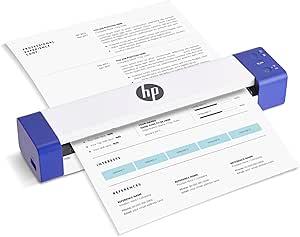 | Best for Versatile Portable Scanning with Wireless | Scanning Speed: 15 ppm | Connectivity: Wi-Fi Direct | Compatibility: Mac and Windows | VIEW LATEST PRICE | See Our Full Breakdown |
| scanner for receipts and business card | Connectivity |
|---|---|
| Canon imageFORMULA R10 Portabl | — |
| Epson WorkForce ES-50 Compact | USB 2.0 |
| Brother DS-640 Compact Mobile | — |
| Epson DS-70 Portable Document | — |
| Epson Workforce ES-400 II High | TWAIN, cloud services |
| Brother DS-640 Mobile Scanner | USB |
| Doxie Pro Duplex Document Scan | Wired |
| ScanSnap iX1300 Wireless or US | — |
| Epson RapidReceipt RR-60 Compa | USB |
| Epson RapidReceipt RR-600W Wir | Wireless, USB |
| Brother DS-720D Mobile Color P | — |
| Epson RapidReceipt RR-620W Wir | Wi-Fi, USB |
| Brother Mobile Color Page Scan | — |
| HP PS150 USB Photo and Documen | Wi-Fi Direct |
More Details on Our Top Picks
Canon imageFORMULA R10 Portable Document Scanner
The Canon imageFORMULA R10 stands out for its lightweight portability combined with duplex scanning, making it ideal for mobile professionals who need quick, reliable document capture on the go. Compared with the Epson DS-70, it offers a larger automatic feeder and broader media compatibility, which benefits users handling multiple types of receipts and business cards. However, it’s less suited for scanning photos or high-volume workflows, as its suggested daily volume is modest. Its broad device compatibility and automatic software updates enhance ease of use, but it’s not designed for heavy-duty or photo scanning. This pick makes the most sense for small business owners or sales reps who want efficient, portable document capture without sacrificing compatibility or speed for everyday receipts and cards.Pros:- Lightweight and portable for mobile use
- Fast duplex scanning with a 20-sheet automatic feeder
- Broad media support and easy setup
Cons:- Limited to document types, not suitable for photo scanning
- Suggested daily volume may be low for high-volume users
Best for: Mobile professionals, small business owners, or sales reps needing portable, reliable document scanning
Not ideal for: High-volume offices or users primarily scanning photos, due to its limited capacity and focus on documents
- Power Consumption:2.5W or less
- Suggested Daily Volume:500 scans
- Media Types:Receipts, business cards, reports, legal documents
- Scanning Speed:Up to 12 pages per minute
- Automatic Document Feeder:20 sheets
- Compatibility:Windows and Mac
Our verdict“Best for mobile users who need a versatile, all-around portable scanner for receipts and business cards.”
Epson WorkForce ES-50 Compact & Lightweight Mobile Document Scanner
The Epson WorkForce ES-50 excels in quick single-page scans, making it perfect for professionals who need fast capture of receipts or business cards on the move. Its compact size and USB-powered design outshine larger scanners like the Canon R10 when portability is the priority, but it’s limited to one sheet at a time, which can slow down workflow for higher volumes. The inclusion of OCR software for searchable files is a major advantage over less feature-rich portable scanners, yet it requires an internet connection and software download, which could be inconvenient in some scenarios. This device suits freelance salespeople or consultants who value speed and portability over bulk capacity.Pros:- Extremely compact and lightweight
- Fast scan time of just 5.5 seconds per page
- Includes OCR for searchable, editable files
- USB-powered, no extra batteries needed
Cons:- Limited to single-sheet scanning at a time
- No wireless connectivity options
Best for: Freelancers or mobile professionals needing quick, single-page scans with searchability
Not ideal for: Small offices or users with high-volume needs, since it cannot scan multiple pages simultaneously
- Scan Speed:5.5 seconds per page
- Maximum Document Size:8.5 x 72 inches
- Connectivity:USB 2.0
- Power:USB-powered
- Software:Epson ScanSmart, Nuance OCR
- Compatibility:Windows and Mac
Our verdict“Ideal for on-the-go professionals who need quick, searchable scans of individual receipts or business cards.”
Brother DS-640 Compact Mobile Document Scanner
The Brother DS-640 delivers remarkably fast scanning speeds of 16 ppm, making it a top choice for those who need rapid document digitization on the go. Its ultra-compact design surpasses the Epson DS-70 in portability, while supporting multiple OS including Linux, which broadens its appeal for diverse environments. Compared to the Canon R10, it’s more focused on speed and image quality, but its reliance on USB 3.0 limits wireless flexibility, and setup can be complex for less tech-savvy users. Like the Epson DS-70, it’s limited to document scans, not photos, but its advanced image features such as color detection and OCR make it highly adaptable for receipts and business cards. It’s ideal for busy field agents or small teams requiring quick, multi-platform document scanning.Pros:- Fast scanning speeds of up to 16 ppm
- Ultra-compact and lightweight for portability
- Supports multiple operating systems including Linux
- Includes advanced image enhancement features
Cons:- Requires USB connection, no wireless options
- Software setup may be complex for some users
Best for: Field agents or small teams needing high-speed, portable document scanning across multiple OS
Not ideal for: Casual users or those needing wireless or photo scanning capabilities
- Scan Speed:16 ppm
- Weight:1.5 lbs
- Dimensions:Less than 1 foot in length
- Power:USB 3.0
- Features:Color detection, image rotation, OCR
- Compatibility:Windows, Mac, Linux
Our verdict“Best for professionals who prioritize speed and multi-platform support in a portable scanner.”
Epson DS-70 Portable Document Scanner
The Epson DS-70 is tailored for users needing fast, single-page scans with minimal fuss. Its exceptional speed of 5.5 seconds per page surpasses most portable options, including the Epson ES-50, making it a top choice for quick receipt and ID scans. Its smallest size and lightweight design make it perfect for tight spaces and frequent travel, but it’s limited to one page at a time, which might hinder workflow for larger batches. The OCR software enhances its utility for creating searchable PDFs, yet it’s less suitable for bulk or multi-page scanning tasks. This device is best suited for business travelers or event staff who need rapid, reliable single-page captures.Pros:- Fastest scan speed for single pages at 5.5 seconds
- Ultra-lightweight and compact
- Includes OCR software for searchable PDFs
- Handles various document sizes including IDs and receipts
Cons:- Limited to single-sheet scanning only
- Designed mainly for portable use, not high-volume workflows
Best for: Travelers or event staff needing fast, single-page document scans with searchability
Not ideal for: Offices or users with high-volume scanning needs or requiring multi-page batch processing
- Size:Smallest and lightest mobile scanner
- Scan Speed:5.5 seconds per page
- Document Size:Up to 8.5″ x 72″
- Warranty:3-year limited with Next-Business-Day Replacement
- Included Software:OCR and document management software
Our verdict“Perfect for quick, single-page scans in mobile or fast-paced environments where speed is essential.”
Epson Workforce ES-400 II High-Speed Color Duplex Desktop Document Scanner
The Epson Workforce ES-400 II is designed for serious office workflows, offering a 50-sheet auto document feeder and double feed detection, which are overkill for casual scanning but invaluable for high-volume environments. Its fast duplex scanning and seamless cloud integration make it a clear choice over portable options like the Canon R10 when speed and capacity are priorities. Its extensive OCR and auto crop features streamline large batch processing, but its size and focus on document handling make it less suitable for mobile use or casual users. This scanner fits well in office settings or home offices where large quantities of receipts and business cards need digitizing efficiently.Pros:- High-speed scanning with a 50-sheet feeder
- Reliable double feed detection reduces errors
- Excellent cloud and software integration
- OCR and auto-crop features boost productivity
Cons:- Bulkier and less portable, not suited for mobile use
- Overkill for small-scale, occasional scanning needs
Best for: Small to medium-sized offices or home offices with high-volume scanning needs
Not ideal for: Travelers or casual users who prioritize portability and single-page scans
- Auto Document Feeder:50 sheets
- Double Feed Detection:Ultrasonic
- Connectivity:TWAIN, cloud services
- Scanning Features:duplex, OCR, auto crop
- Compatibility:Office and home workflows
Our verdict“Ideal for busy office environments requiring high-volume, efficient document digitization with advanced features.”
Brother DS-640 Mobile Scanner
The Brother DS-640 stands out for its portability, making it ideal for professionals who need to scan receipts and business cards while traveling or in the field. Its compact design and lightweight build mean it easily slips into a bag, unlike bulkier desktop models like the Epson RR-600W. With a fast 15 ppm speed, it handles multiple documents quickly, but its reliance on USB 3.0 limits flexibility—no Wi-Fi or mobile connectivity options are available. It’s perfect for those who prioritize mobility over advanced features like duplex scanning or cloud integration. The absence of Wi-Fi might be a drawback when working in environments that require wireless access, but for simple, quick scans on the go, this is a reliable choice.
Pros:- Extremely portable and lightweight design
- Fast scanning speed of 15 pages per minute
- Powered directly via USB 3.0, no external power needed
Cons:- No Wi-Fi or wireless connectivity options
- Limited to USB power, reducing flexibility
- No duplex scanning feature for two-sided documents
Best for: Travelers and mobile professionals needing quick, portable receipt and card scans
Not ideal for: Office-based users who want wireless connectivity and multi-device setup
- Speed:15 pages per minute
- Power:USB 3.0
- Document Size:A4
- Color:Color
- Connectivity:USB
- Compatibility:Windows, macOS
Our verdict“This scanner is best suited for mobile users prioritizing portability over advanced wireless features.”
Doxie Pro Duplex Document Scanner and Receipt Scanner for Home and Office
The Doxie Pro excels at delivering crisp, two-sided scans with automatic cropping, rotation, and contrast enhancement, making it a top choice for users who need detailed, high-quality images of receipts and business cards. Compared with the ScanSnap iX1300, it offers superior duplex features and automatic editing, but it is solely wired, which reduces portability. Its compact size and easy software integration suit home offices or small teams well, yet the lack of wireless connectivity could be limiting for those who want a cable-free experience. Its price might be higher than entry-level models, but the quality and automation features justify the investment for frequent scanners.
Pros:- Excellent duplex scanning with automatic cropping and contrast
- Compact and lightweight design
- Easy integration with cloud services and software
Cons:- Wired connection limits mobility
- No wireless or mobile app support
- Higher price point compared to basic models
Best for: Small business owners and home office users seeking high-quality, duplex scans
Not ideal for: Mobile professionals who need wireless, portable options
- Dimensions:11.75 x 4 x 3 inches
- Weight:Just over 3 pounds
- Connectivity:Wired
- Duplex Scanning:Yes
- Software Features:Automatic cropping, contrast, cloud support
- Document Size:Standard & Receipts
Our verdict“Ideal for users prioritizing duplex quality and automation over portability or wireless features.”
ScanSnap iX1300 Wireless or USB Double-Sided Color Document Scanner, Black
The ScanSnap iX1300 offers a blend of speed, convenience, and versatility, making it suitable for small offices or home setups. Its duplex scanning capacity of up to 30 pages per minute surpasses many competitors like the Epson RR-60, providing more efficient workflows. Its support for wireless and USB connections enables flexible placement and use across multiple devices, unlike wired-only options. The scanner’s compact design fits well in tight spaces, and its one-touch operation simplifies daily scanning tasks. However, its sheet capacity is limited to 20 pages per scan, which might slow down high-volume tasks, and it lacks advanced OCR features for editing or searching documents without external software. This model is an excellent middle-ground for users who want speed and flexibility without sacrificing space.
Pros:- Supports wireless and USB connectivity
- Fast duplex scanning up to 30 ppm
- Compact, space-saving design
Cons:- Limited sheet capacity of 20 pages per scan
- No built-in OCR or editing features
- Requires software setup for full functionality
Best for: Small business owners and busy professionals needing quick, flexible document handling
Not ideal for: High-volume offices requiring large capacity or advanced OCR functionalities
- Scanner Type:Document, Receipt
- Connection Type:USB, Wi-Fi
- Resolution:600 dpi
- Item Dimensions:4.5″D x 11.7″W x 3.3″H
- Item Weight:4.4 pounds
- Standard Sheet Capacity:20
Our verdict“A versatile, space-efficient scanner ideal for busy users who value speed and wireless options.”
Epson RapidReceipt RR-60 Compact Mobile Document Scanner
The Epson RapidReceipt RR-60 is designed for quick, on-the-go receipt and small document scans. Its ultra-lightweight design under 10 ounces makes it a standout for mobile professionals who need fast, reliable scans without bulk. With a modest speed of 10 ppm, it’s not the fastest, but its AI-powered features—automatic organization, cropping, and background removal—add significant value, especially when managing large volumes of receipts. Compared with larger desktop scanners like the RR-600W, it excels in portability but falls short on handling larger documents or multi-page stacks efficiently. It’s best suited for users who need to scan receipts in the field, not for extensive document archiving or high-volume workflows.
Pros:- Extremely lightweight and portable
- AI-powered automatic organization and cropping
- High-resolution scans with background removal
Cons:- Limited to small documents and receipts
- Requires connection to PC or Mac for full software features
- Slower scan speed compared to desktop models
Best for: Freelancers or small business owners who need mobile receipt management
Not ideal for: Users with high-volume scanning needs or larger documents
- Scan Speed:10 pages per minute
- Weight:Under 10 oz
- Connectivity:USB
- Maximum Document Size:8.5 x 72 inches
- Software Compatibility:Windows and Mac
Our verdict“Perfect for mobile receipt scanning, especially when portability and AI features are priorities.”
Epson RapidReceipt RR-600W Wireless Desktop Color Duplex Receipt and Document Scanner with Receipt Management Software, Touchscreen and Auto Document Feeder. Full 1-Year Limited Warranty (Renewed)
The Epson RR-600W elevates the scanning process with its high-speed duplex capability of up to 35 ppm and a 100-page auto document feeder, making it ideal for busy environments with high document throughput. Its wireless connectivity and touchscreen interface facilitate PC-free operation, allowing users to scan directly to email, cloud storage, or USB drives with ease. The ScanSmart AI PRO technology enhances productivity by automatically extracting data and categorizing receipts, streamlining workflows for accounting or record-keeping. Compared to the more basic models, this scanner offers a comprehensive package for high-volume tasks, but it comes at a higher cost and requires setup time. It’s best suited for small offices or teams handling large stacks of receipts and documents daily.
Pros:- High-speed duplex scanning up to 35 ppm
- Large 100-page auto document feeder
- Wireless connectivity and PC-free operation
Cons:- Higher price point compared to simpler models
- Setup complexity and initial configuration required
- Bulkier footprint suitable for desktop use only
Best for: Small offices or accounting teams needing high-speed, automated document processing
Not ideal for: Individuals with low scanning volume or those seeking a budget-friendly mobile option
- Scan Speed:Up to 35 ppm
- Document Feeder Capacity:100 pages
- Connectivity:Wireless, USB
- Touchscreen:Yes, 4.3-inch color
- Paper Size:Up to 8.5 x 72 inches
- Warranty:1 year
Our verdict“A robust, automated scanner perfect for high-volume receipt workflows in small business settings.”
Brother DS-720D Mobile Color Page Scanner
The Brother DS-720D stands out as the ideal choice for professionals who need quick, portable scans of receipts, cards, and documents without sacrificing quality. Its compact, lightweight design makes it easy to carry, and it delivers high-resolution color or black & white scans at 600 dpi, comparable to larger desktop models like the Epson RR-620W but with less speed and fewer features. While it supports media up to 8.5 inches wide and 32 inches long, its maximum duplex speed of 5 ppm is a limitation for high-volume tasks. This scanner suits users who prioritize portability and quality over speed or advanced automation, but it lacks wireless connectivity, which could be a drawback for those needing wireless flexibility. Overall, it makes the most sense for mobile professionals or remote workers requiring reliable, on-the-go document capture.
Pros:- Extremely portable and lightweight, less than 1 pound
- High-quality 600 dpi scans in color and black & white
- Supports various media types including photos and ID cards
- Includes versatile software for document and OCR management
Cons:- Limited duplex speed at 5 pages per minute, slow for bulk tasks
- No wireless connectivity, reducing flexibility in some settings
Best for: Travelers and field professionals needing portable, high-quality scans without complex setup.
Not ideal for: Office workers with high-volume scanning needs or those requiring wireless connectivity for multiple users.
- Scanning Speed:8 ppm
- Duplex Speed:5 ppm
- Maximum Media Width:8.5 inches
- Maximum Media Length:32 inches
- Resolution:600×600 dpi
- Weight:Less than 1 pound
Our verdict“This scanner is best suited for mobile users who need quick, reliable scans on the go without the need for wireless features.”
Epson RapidReceipt RR-620W Wireless & USB Desktop Color Duplex Receipt & Document Scanner
The Epson RR-620W is designed for busy offices that need rapid, efficient scanning with minimal manual intervention. Its impressive 45 ppm duplex speed far exceeds the other options like the Brother DS-720D or Brother DS-620, making it ideal for high-volume environments. The 100-page auto document feeder and 4.3-inch touchscreen simplify batch processing and operation, while wireless and USB connectivity add flexibility. Unlike the Brother DS-720D, which lacks wireless, the RR-620W is better suited to teams that need fast, automated workflows with AI-ready data extraction capabilities. However, the higher price and complexity make it less suitable for casual or infrequent users. This pick makes the most sense for small businesses or teams handling large volumes of receipts and documents daily.
Pros:- Blazing-fast 45 ppm duplex scanning for large batches
- Large 100-page automatic document feeder improves efficiency
- Intuitive 4.3-inch touchscreen simplifies operation
- Wireless and USB connectivity for versatile setup
Cons:- Higher price point compared to simpler scanners
- Can be complex for users unfamiliar with advanced features or AI technology
Best for: Small business teams and administrative offices with high-volume scanning demands.
Not ideal for: Individuals or casual users who prioritize portability over speed or automation features.
- Scanning Speed:45 ppm
- Auto Document Feeder:100 pages
- Touchscreen:4.3 inches
- Connectivity:Wi-Fi, USB
- AI Technology:Yes
- Maximum Media Width:Not specified
Our verdict“This scanner is perfect for high-volume environments demanding speed, automation, and flexible connectivity, but less so for casual or infrequent use.”
Brother Mobile Color Page Scanner DS-620
The Brother DS-620 combines portability with simplicity, making it suitable for quick scans of receipts, business cards, and documents in a mobile setting. Its USB-powered operation means it requires no external power source, unlike the Epson RR-620W or HP PS150, which rely on wireless or external power. Compared with the Brother DS-720D, it is more portable but offers the same modest speed of 8 pages per minute, making it less suitable for large batch processing. Its limited daily duty cycle of 100 pages may restrict heavy use, and some users report driver compatibility issues with Windows 10, which could hinder ease of use. This model works best for remote workers or salespeople needing a small, reliable scanner for occasional use, not heavy-duty office environments.
Pros:- Extremely compact and lightweight, under 12 inches long
- USB-powered for simple, cable-only operation
- Fast scanning speed of 8 pages per minute
- Supports media up to 8.5 x 32 inches
Cons:- Limited daily duty cycle, not suited for frequent use
- Possible driver compatibility issues with Windows 10
Best for: Sales professionals and remote workers needing a lightweight, USB-powered scanner for occasional use.
Not ideal for: Offices with high-volume daily scanning or users needing wireless connectivity and advanced features.
- Scan Speed:8 ppm
- Color Support:Color and black/white
- Dimensions:Under 12 inches
- Weight:Less than 1 pound
- Media Size:Up to 8.5 x 32 inches
- Max Daily Duty Cycle:100 pages
Our verdict“This scanner is best for mobile users needing a simple, portable device for light scanning tasks, but not for high-volume or wireless needs.”
HP PS150 USB Photo and Document Scanner
The HP PS150 offers a versatile solution for remote workers and small businesses that need duplex scanning at a decent pace of 15 pages per minute. Its Wi-Fi Direct feature allows wireless operation, comparable to the Epson RR-620W but with a focus on portability. It supports a variety of materials including receipts, business cards, and documents, making it more adaptable than the Brother DS-620. However, its slower speed compared to the high-capacity Epson RR-620W might be a limiting factor for very high-volume tasks. The absence of advanced OCR or AI features means it’s best suited for users who want quick, portable scans and occasional wireless convenience rather than intensive automation. It’s a good fit for remote professionals needing flexibility and broad compatibility.
Pros:- Wireless Wi-Fi Direct connectivity for flexibility
- Duplex scanning at 15 pages per minute for efficiency
- Supports multiple document types including receipts and cards
- Compatible with Mac and Windows
Cons:- Slower than high-speed desktop scanners like Epson RR-620W
- No mention of OCR or advanced image processing features
Best for: Remote workers and small business owners seeking a portable, wireless scanner for diverse document types.
Not ideal for: High-volume offices or users requiring advanced data extraction and high-speed batch processing.
- Scanning Speed:15 ppm
- Connectivity:Wi-Fi Direct
- Compatibility:Mac and Windows
- Supported Materials:Documents, receipts, business cards
Our verdict“This scanner is ideal for remote professionals needing versatile, wireless duplex scanning but not suited for very high-volume or automation-heavy workflows.”

How We Picked
These scanners were evaluated based on performance, ease of use, build quality, speed, and value. Priority was given to models that handle receipt and business card sizes efficiently while maintaining quick throughput for busy environments. We also considered portability for mobile users, connectivity options, and software integration for organized digital storage. The ranking aims to balance these factors, highlighting devices that deliver reliable results without excessive complexity or cost, ensuring options for different needs and budgets.Factors to Consider When Choosing Best Scanner For Receipts And Business Cards
When choosing the best scanner for receipts and business cards, it’s important to consider several key factors that influence usability and value. Not all scanners are created equal, and understanding your specific needs can help you avoid costly mistakes. The right device should match your volume, mobility requirements, and preferred connectivity type, so weighing these aspects carefully can ensure a smoother experience.Portability and Size
If you frequently scan on the move, a compact, lightweight scanner is essential. Mobile models like the Epson WorkForce ES-50 or Epson DS-70 are designed to easily fit into bags or pockets, making them ideal for travel or remote work. However, smaller devices might sacrifice speed or scanning capacity, so if your workload is heavy, a slightly larger desktop model could be more efficient despite less portability.
Speed and Duplex Scanning
For high-volume environments, speed becomes critical. Models like the Epson Workforce ES-400 II deliver high-speed, duplex (double-sided) scanning, drastically reducing time spent on each batch. Duplex scanning is particularly important for receipts and cards that often have information on both sides. Keep in mind, however, that faster scanners tend to be larger and more expensive, so balance your volume needs with available space and budget.
Connectivity Options
Wireless models provide convenience by allowing scanning directly to mobile devices or cloud services, but they may face connectivity hiccups or delays. Wired USB or Ethernet connections tend to be more stable, especially in busy office settings. Consider your environment and how you plan to integrate the scanner into your workflow before choosing between wireless and wired options.
Software and Compatibility
Effective software can streamline your workflow, especially for organizing and saving receipts or business cards. Look for scanners that come with user-friendly OCR (Optical Character Recognition) software, which transforms scans into editable, searchable files. Compatibility with your operating system and integration with cloud storage solutions like Dropbox or Google Drive can also save time and reduce manual organization efforts.
Cost and Durability
Prices vary significantly, with premium models offering faster speeds, more robust construction, and advanced features, but at a higher cost. For occasional use, a budget-friendly scanner can suffice, but for daily or heavy-duty needs, investing in a more durable device often pays off by reducing maintenance and replacement costs over time. Always consider the total cost of ownership, including software and warranty support.
Frequently Asked Questions
Will a portable scanner handle large batches of receipts efficiently?
Portable scanners are designed for convenience and quick scans on the go, but they often have limited capacity and slower speeds compared to desktop models. If you process large batches regularly, a high-speed desktop scanner with an auto document feeder is likely more effective. Portable devices excel in flexibility but may require more time to handle extensive workflows.
Can wireless scanners reliably scan receipts and business cards?
Wireless scanners offer great flexibility for mobile use, but their reliability depends on your Wi-Fi stability and device compatibility. In environments with weak signals or network congestion, wired connections tend to be more stable and quicker. For critical or high-volume tasks, a wired setup can reduce frustration caused by dropped connections or lag.
Are duplex scanners worth the extra cost?
Duplex scanners are highly beneficial if you often scan both sides of receipts or business cards, saving significant time. While they do cost more upfront, the efficiency gains for frequent use can justify the expense. For occasional scanning, single-sided models might be sufficient, but for regular batch processing, duplex capability becomes a valuable feature.
What software features should I look for in a receipt scanner?
Good receipt scanners come with OCR software that converts images into editable, searchable files. Look for software that integrates with popular cloud services and offers easy organization tools. Software that supports batch scanning and automatic file naming can also streamline your workflow, reducing manual input and minimizing errors.
Is paying more for a scanner worth it for home use?
For occasional home use, a budget-friendly model may suffice, but investing in a slightly more capable device can improve reliability and reduce frustration. Higher-priced options often include faster processing, better software, and more durable hardware, which can make them worth considering if you plan to scan frequently or want a device that lasts longer without issues.