Finding the best premium POS system for a small business office involves balancing advanced features with ease of use and reliable performance. The Square Register stands out for its seamless integration and user-friendly interface, making it ideal for busy retail environments. The Volcora 15.6-Inch POS Terminal offers robust hardware suited for high-volume transactions, but comes with a higher price tag. Meanwhile, systems like the SumUp POS Lite provide a more affordable entry point with solid core features. As these systems vary widely in complexity, cost, and capabilities, weighing your specific needs against these tradeoffs is essential. Continue reading for a detailed comparison to help you select the best fit for your small office.

Get smart everyday buys delivered free with Prime
- Fast, free delivery on millions of items
- Prime Video, Amazon Music and more included
- Member-only deals all year
Key Takeaways
- The top-ranking systems excel in blending hardware quality with intuitive software for small business offices.
- Price can vary significantly; premium doesn’t always mean the most expensive—consider features versus cost.
- Systems with integrated peripherals like receipt printers and cash drawers streamline operations but add to upfront costs.
- Ease of use and setup time are crucial for small teams that need to minimize training and disruptions.
- Compatibility with existing hardware and software ecosystems is a key factor influencing long-term satisfaction.
| Square Register Point-of-Sale System | 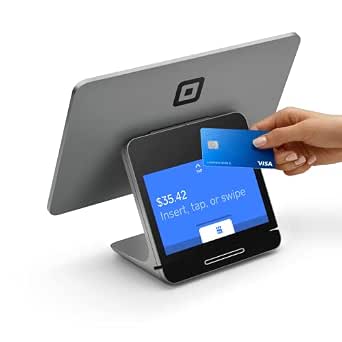 | Best Overall for Seamless Integration and Offline Payments | Package dimensions: 17.5 x 16.5 x 9 inches | Item weight: 5.9 pounds | Displays: Two touchscreen displays | VIEW LATEST PRICE | See Our Full Breakdown |
| Square Terminal Mobile Payment and Receipt Printer |  | Best for Portability and On-the-Go Payments | Dimensions: 5.6 x 3.4 x 2.5 inches | Weight: 14.7 ounces | Battery: 1 lithium-ion battery included | VIEW LATEST PRICE | See Our Full Breakdown |
| Square Handheld Portable POS and Credit Card Machine |  | Best for Tableside Service and Barcode Scanning | Dimensions: 7.04 x 3.12 x 0.62 inches | Weight: 2.11 ounces | Connectivity: Offline payments, barcode scanner | VIEW LATEST PRICE | See Our Full Breakdown |
| Touchscreen POS Cash Register with Thermal Receipt Printer | 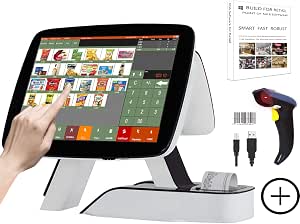 | Best for Retail and Restaurant with Complete Hardware Bundle | Main display: 15 inches, 1024 × 768 | Customer display: 11.6 inches | Printer: Built-in 58 mm thermal receipt printer | VIEW LATEST PRICE | See Our Full Breakdown |
| Volcora 15.6-Inch Windows 11 Professional POS Terminal |  | Best for Versatile, Windows-Based Small Business Systems | Operating system: Windows 11 Professional | Processor: Intel Core i5 | Memory: 4 GB RAM | VIEW LATEST PRICE | See Our Full Breakdown |
| SmartPOS 129 All-in-One Cash Register System for Small Businesses |  | Best Overall for Complete Hardware Integration | Cashier touchscreen: 15 inches | Customer-facing display: 15 inches | Included components: Cash drawer, handheld scanner, thermal printer | VIEW LATEST PRICE | See Our Full Breakdown |
| SumUp POS Lite 13-Inch Touchscreen Point of Sale System |  | Best for Budget-Conscious Small Retailers | Screen: 13-inch touchscreen | Stand: Die-cast aluminum | Software: Pre-installed POS with updates | VIEW LATEST PRICE | See Our Full Breakdown |
| ZHONGJI A3 Touchscreen POS Cash Register System with Receipt Printer, Cash Drawer, and Kitchen Printer |  | Best for Retail and Restaurant Hybrid Needs | Screen: 15-inch touchscreen, 1024 × 768 | Processor: Intel i5 | RAM: 8 GB | VIEW LATEST PRICE | See Our Full Breakdown |
| Retail POS System with 15-Inch Touchscreen PC, CRE Software, Receipt Printer, Barcode Scanner, Cash Drawer, and Customer Display |  | Best for Retail Operations with Inventory and Employee Tracking | Touchscreen: 15 inches | Operating System: Windows 10 Pro | Software: Cash Register Express (CRE) | VIEW LATEST PRICE | See Our Full Breakdown |
| Square Register (2nd Generation) Point-of-Sale System |  | Best for Simple, Modern Countertop POS | Brand: Square | Model: A-SKU-0908 | Weight: 12.5 pounds | VIEW LATEST PRICE | See Our Full Breakdown |
| Datio POS System with Cash Drawer and Receipt Printer for Compatible iPads |  | Best Compact All-in-One for Small Retail and Food-Service Businesses | Compatible devices: Apple iPads with 9.7–10.2-inch displays | Included components: Cash drawer, iPad stand, thermal receipt printer, connection cables | Printer type: Thermal | VIEW LATEST PRICE | See Our Full Breakdown |
More Details on Our Top Picks
Square Register Point-of-Sale System
The Square Register stands out for its all-in-one design, combining hardware, payment processing, and POS software into a highly integrated system. Its dual touchscreen displays facilitate smooth transactions, with one for the seller and one for the customer, making it ideal for small retail or restaurant environments. Compared with the Square Terminal, it offers a more complete setup, especially suited for businesses that need a dedicated POS station. The hardware’s offline payment capability ensures sales can proceed even when Wi-Fi is interrupted, a critical advantage for busy small offices. However, this system’s hardware approval is country-specific, and adding peripherals like printers or cash drawers involves extra cost. Best for small businesses prioritizing integration, offline capability, and a comprehensive POS experience.
Pros:- All-in-one hardware, software, and payment processing
- Dual touchscreen displays for efficient customer and seller interactions
- Supports offline payments, ensuring sales continuity
Cons:- Hardware approval limited to specific countries, restricting international use
- Additional peripherals like printers and cash drawers are optional, adding cost
Best for: Small retail or restaurant owners seeking a comprehensive, integrated POS system with offline capabilities
Not ideal for: Businesses that need portable, battery-powered devices or frequently move their POS setup around, as the hardware is fixed and country-specific
- Package dimensions:17.5 x 16.5 x 9 inches
- Item weight:5.9 pounds
- Displays:Two touchscreen displays
- Payment methods:EMV chip, NFC/contactless, and magstripe
- Connectivity feature:Offline Mode
- Warranty:2-year limited warranty
Our verdict“This system is ideal for small businesses that value a robust, integrated POS with offline payment support and don’t require portability.”
Square Terminal Mobile Payment and Receipt Printer
The Square Terminal excels in mobility, combining the functions of a payment terminal and receipt printer into a compact device. Its lightweight design and built-in battery support cordless transactions, making it perfect for businesses that operate in multiple locations or need to serve customers at tables or stalls. Unlike the Square Register, which is more fixed in a retail setting, the Terminal offers flexibility for small offices that require a portable solution. While its all-day battery life is a goal rather than a guaranteed feature, it supports major card types and includes 24/7 fraud prevention and support. The main tradeoff is that some features depend on a Square subscription, which could add ongoing costs. Best suited for small businesses needing mobility without sacrificing comprehensive payment acceptance.
Pros:- Accepts major credit and debit cards with ease
- Built-in receipt printer for streamlined transactions
- Cordless use supported by a built-in battery
Cons:- Battery life is a design target, not a guaranteed runtime, potentially limiting all-day use
- Some features require ongoing Square subscription fees
Best for: Cafés, food trucks, or small retail outlets that focus on mobile transactions and convenience
Not ideal for: Businesses that require a fixed POS station with integrated peripherals like barcode scanners and cash drawers, as the Terminal is primarily portable
- Dimensions:5.6 x 3.4 x 2.5 inches
- Weight:14.7 ounces
- Battery:1 lithium-ion battery included
- Payment methods:Major credit and debit cards
- Supported features:Receipts, contactless, chip payments
- Support:24/7 phone and fraud prevention
Our verdict“This device is best for small offices that prioritize portable, quick payments and receipt printing on the move.”
Square Handheld Portable POS and Credit Card Machine
The Square Handheld offers a highly portable solution, ideal for taking payments, managing tableside orders, and scanning barcodes on the fly. Its pocket-sized, splash- and dust-resistant design makes it a versatile tool for small offices that need mobility and durability. Compared to fixed systems like the Touchscreen POS, this device excels in environments where staff need to move freely and still process offline payments. Its long-lasting battery supports extended use, but the protective case for accidental drops is optional, meaning users should consider purchasing extra protection if needed. This device’s main limitation is that its features are somewhat basic, and it lacks the full breadth of integrations found in larger systems. Best for small offices that require a lightweight, durable, and versatile mobile payment device.
Pros:- Lightweight, pocketable design for easy portability
- Supports tableside orders and barcode scanning
- Long battery life and offline payment support
Cons:- Optional protective case adds extra cost, and the device itself is minimalistic
- Limited in advanced features and integrations compared to full POS systems
Best for: Cafés, food trucks, or retail staff needing a portable device for tableside payments and barcode scanning
Not ideal for: Businesses looking for a fixed, comprehensive POS system with advanced management features, as this device is primarily for mobile use
- Dimensions:7.04 x 3.12 x 0.62 inches
- Weight:2.11 ounces
- Connectivity:Offline payments, barcode scanner
- Durability:Splash and dust resistant
- Built-in feature:Barcode scanner
- Payment methods:Major credit and debit cards
Our verdict“This device is ideal for small offices that need a durable, portable payment solution for on-the-spot transactions and order management.”
Touchscreen POS Cash Register with Thermal Receipt Printer
The Touchscreen POS Cash Register provides an all-in-one setup with a large 15-inch main display, an 11.6-inch customer screen, and a comprehensive hardware bundle including a thermal receipt printer, cash drawer, and barcode scanner. Its robust processing power, with an Intel i5 and 8 GB RAM, supports complex retail or restaurant operations. In comparison to compact portable options like the Square Handheld, it offers a more permanent, high-capacity solution for small offices that need a fixed station. While the main display’s resolution is modest at 1024 × 768, the system’s software covers billing, order management, and discounts effectively. Its size and weight make it less portable, but it compensates with extensive features. Best for small retail or restaurant environments requiring a feature-rich, stationary POS system.
Pros:- Includes POS software for billing, orders, and discounts
- All-in-one hardware with touchscreen, receipt printer, cash drawer, and barcode scanner
- Designed for retail and restaurant applications
Cons:- Main display resolution limited to 1024 × 768, which may affect clarity
- Relatively heavy and less portable for mobile use
Best for: Small businesses needing a complete, fixed POS station with integrated peripherals for retail or dining
Not ideal for: Mobile or pop-up businesses that require portability, as this setup is designed to stay in one place
- Main display:15 inches, 1024 × 768
- Customer display:11.6 inches
- Printer:Built-in 58 mm thermal receipt printer
- Processor:Intel i5
- RAM:8 GB
- Storage:128 GB SSD
- Included accessories:Cash drawer, barcode scanner, keyboard, mouse
Our verdict“This system suits small offices that need a comprehensive, stationary POS with multiple peripherals for retail or dining operations.”
Volcora 15.6-Inch Windows 11 Professional POS Terminal
The Volcora POS Terminal offers a full Windows 11 environment on a sizeable 15.6-inch capacitive touchscreen, making it a flexible choice for small offices that want familiar software options. Its Intel Core i5 processor and 4 GB of RAM provide decent performance for standard retail or hospitality tasks, but compared to dedicated POS systems like the Touchscreen POS, it’s more of a hardware platform than a ready-to-go solution, since the POS software itself isn’t specified. Its multiple ports support extensive peripheral connections, which can be a double-edged sword—offering flexibility but potentially cluttering the workspace. Its limited RAM may slow down multitasking, but the heavy-duty metal base ensures durability. This makes sense for small offices that prefer Windows compatibility and a customizable setup.
Pros:- Large 1366 x 768 capacitive touchscreen
- Multiple connectivity ports for peripherals
- Heavy-duty metal base with compact footprint
Cons:- Only 4 GB RAM, which may limit multitasking and speed
- POS software is not included, requiring additional setup and licensing
Best for: Small retail or restaurant owners who want a versatile, Windows-based POS with multiple peripheral options
Not ideal for: Operators seeking a turnkey POS with integrated software and minimal setup, as this is more hardware-focused and less plug-and-play
- Operating system:Windows 11 Professional
- Processor:Intel Core i5
- Memory:4 GB RAM
- Storage:128 GB HDD
- Screen size:15.6 inches
- Display resolution:1366 x 768
- Ports:2 serial, 4 USB, HDMI, Ethernet
Our verdict“This choice is perfect for small offices that want a flexible, Windows-based hardware platform with extensive connectivity and a durable build.”
SmartPOS 129 All-in-One Cash Register System for Small Businesses
This all-in-one POS system shines for small businesses that need a comprehensive checkout setup without relying on external hardware. Its bundled components—15-inch cashier and customer displays, cash drawer, scanner, and thermal printer—offer a seamless checkout experience. Compared to the ZHONGJI A3, which also includes various peripherals, the SmartPOS 129 stands out for its flexible integration with over 50 card processors and no mandatory subscription fees. However, its weight and size may pose challenges for space-constrained locations. The included setup call and mobile app enhance ease of deployment, making it ideal for businesses seeking a turnkey solution. Tradeoffs include its bulkiness and lack of specified processing service costs.
Pros:- Includes all essential hardware components for a complete checkout station
- Supports over 50 card processors, offering flexibility in payment options
- No forced subscription fees, reducing ongoing costs
- Includes initial setup call and mobile app for easier deployment
Cons:- Large and heavy at 53.9 pounds, which may be cumbersome in tight spaces
- Card processing service costs are not included or specified
Best for: Small retail or quick-service restaurants needing a fully integrated, stand-alone checkout station
Not ideal for: Businesses with limited space or those preferring lightweight, portable systems
- Cashier touchscreen:15 inches
- Customer-facing display:15 inches
- Included components:Cash drawer, handheld scanner, thermal printer
- Card processor integrations:Over 50
- Product dimensions:21 x 22 x 35 inches
- Item weight:53.9 pounds
Our verdict“This pick suits small businesses seeking a robust, all-in-one POS solution with extensive processor compatibility.”
SumUp POS Lite 13-Inch Touchscreen Point of Sale System
The SumUp POS Lite offers a sleek, compact touchscreen solution that’s perfect for small retail outlets or cafes. Its 13-inch display and aluminum stand create a modern, space-efficient setup. Compared with the Square Register, which also provides dual screens and offline support, the SumUp POS Lite is more flexible in hardware choices and avoids fixed monthly fees. However, the 2.6% plus 10 fee per card transaction can add up for high-volume businesses. Automated software updates and a straightforward interface make it accessible for stores new to POS systems, but reliance on card processing fees is a clear tradeoff. This system is best suited for small retailers prioritizing simplicity and low upfront costs.
Pros:- No fixed monthly fees or binding contracts
- Pre-installed POS software with automatic updates
- Supports sales, reporting, and item management
- Compact, lightweight design
Cons:- Charges a transaction fee of 2.6% plus 10 for card payments, which can add up
- Limited to card payments; lacks extensive hardware options
Best for: Small retail shops or cafes looking for an affordable, easy-to-use POS with no fixed monthly costs
Not ideal for: High-volume merchants or those seeking integrated hardware bundles with minimal transaction fees
- Screen:13-inch touchscreen
- Stand:Die-cast aluminum
- Software:Pre-installed POS with updates
- Card payment fee:2.6% plus 10
- Item weight:6.11 pounds
- Product dimensions:15.05 x 12.01 x 5 inches
Our verdict“Ideal for small businesses that prefer a low-cost, flexible POS system with straightforward card processing fees.”
ZHONGJI A3 Touchscreen POS Cash Register System with Receipt Printer, Cash Drawer, and Kitchen Printer
The ZHONGJI A3 combines powerful hardware with versatile software, making it suitable for retail stores and restaurants that require order management alongside checkout. Its 15-inch screen and Intel i5 processor deliver reliable performance, especially compared with the SumUp POS Lite’s limited hardware. The inclusion of receipt, kitchen printers, and a stainless steel cash drawer offers a comprehensive setup. However, the 1024 × 768 resolution may feel dated compared to modern high-resolution displays, and limited warranty details may concern cautious buyers. This system excels in environments needing integrated billing, order processing, and customer management, yet it’s less optimal for businesses prioritizing high-resolution visuals or extensive software support. Tradeoffs include a lower screen resolution and limited warranty info.
Pros:- Includes register, receipt, cash drawer, and kitchen printer in one package
- Supports retail and restaurant operations with tailored software
- Powerful Intel i5 processor and 8 GB RAM ensure reliable multitasking
- Free lifetime after-sale service adds peace of mind
Cons:- Screen resolution is relatively low at 1024 × 768, affecting display clarity
- Limited information on warranty and support terms
Best for: Mid-sized retail shops or restaurants seeking an integrated POS with multiple peripherals
Not ideal for: Small or space-constrained businesses that require high-resolution screens or minimal hardware
- Screen:15-inch touchscreen, 1024 × 768
- Processor:Intel i5
- RAM:8 GB
- Storage:128 GB SSD
- Included hardware:Receipt printer, cash drawer, kitchen printer
- Software:MSJ POS for retail or restaurant
Our verdict“Best suited for businesses needing a versatile, all-in-one POS system with integrated peripherals for retail or dining environments.”
Retail POS System with 15-Inch Touchscreen PC, CRE Software, Receipt Printer, Barcode Scanner, Cash Drawer, and Customer Display
This retail-focused POS bundle offers a robust setup with a 15-inch touchscreen PC and comprehensive software support. Its integration with Cash Register Express (CRE) provides detailed inventory, sales, returns, and employee management, making it a strong contender for stores with complex needs. Compared to the Square Register, which emphasizes simplicity and offline capability, the CRE-based system offers more depth in back-end management but at the cost of added weight and setup complexity. The 60-day support window limits immediate post-deployment help, which might be a concern for some. Overall, this system balances advanced retail features with a traditional PC form factor, suitable for stores with growth plans. Tradeoffs involve weight and limited post-sale support period.
Pros:- Includes all necessary hardware—touchscreen, printer, scanner, cash drawer, customer display
- Supports inventory, sales, returns, and employee tracking with CRE software
- Integrates with QuickBooks Desktop for accounting ease
- One-year hardware warranty and 60 days of setup support
Cons:- Weighs 40 pounds, which could impact mobility
- Limited setup and training support duration may slow initial deployment
Best for: Retail stores needing detailed inventory, employee management, and QuickBooks integration
Not ideal for: Small or mobile businesses that require lightweight, portable POS solutions
- Touchscreen:15 inches
- Operating System:Windows 10 Pro
- Software:Cash Register Express (CRE)
- Receipt Printer:Thermal, USB
- Barcode Scanner:Laser, USB
- Hardware Warranty:1 year
Our verdict“Best for established retail businesses looking for deep management features and accounting integration in a reliable, all-in-one package.”
Square Register (2nd Generation) Point-of-Sale System
Square Register’s dual touchscreen design offers a sleek, modern interface that’s ideal for small, countertop-focused businesses. Its integrated software supports sales, inventory, and customer management, providing a unified experience that’s especially appealing to retailers and cafes wanting minimal setup fuss. Compared with the ZHONGJI A3, which includes extensive peripherals, Square Register’s built-in hardware simplifies deployment but limits customization options. Its IP54-rated protection against spills and dust enhances durability, yet the requirement for a corded power source and regional hardware restrictions might restrict flexibility. It’s a strong choice for businesses prioritizing ease of use over extensive hardware options. This system works best for owners seeking a stylish, all-in-one POS for straightforward retail or hospitality settings.
Pros:- Dual touchscreens facilitate staff and customer interactions
- Built-in POS software handles sales, inventory, and customer data
- Supports offline transactions and next-day funds
- Durable, IP54-rated design resists spills and dust
Cons:- Requires a corded power source, reducing mobility
- Hardware is region-specific, limiting international use
Best for: Small retail stores or cafes wanting a sleek, easy-to-operate countertop POS with offline capability
Not ideal for: Businesses needing extensive peripherals or custom hardware configurations
- Brand:Square
- Model:A-SKU-0908
- Weight:12.5 pounds
- Connectivity:Bluetooth, USB, Wi-Fi
- Compatible devices:POS, smartphone, tablet
Our verdict“This system suits small businesses seeking a modern, durable, and easy-to-use POS with offline capabilities and minimal hardware fuss.”
Datio POS System with Cash Drawer and Receipt Printer for Compatible iPads
This Datio POS bundle stands out for its straightforward, all-in-one design that combines essential hardware—cash drawer, thermal receipt printer, and iPad stand—making it a clean, space-efficient solution. Compared to the Square Register, which offers a more integrated hardware-and-software experience, this setup is more customizable but requires separate hardware purchase and a monthly app subscription, which can add to ongoing costs. The thermal printer’s inkless operation minimizes maintenance, while the included stand ensures stability. However, the need to buy an iPad separately can increase initial costs, and the monthly subscription might be a barrier for budget-conscious small businesses. This pick makes the most sense for small retail or food-service operations that already own an iPad and prefer a straightforward, space-saving setup without the bells and whistles of larger terminals.
Pros:- Complete hardware bundle with cash drawer, receipt printer, and stand for easy setup
- Thermal printer eliminates ink and toner costs, reducing maintenance
- Compact design fits small counters and limited spaces
- Designed specifically for retail and food-service environments
Cons:- Requires purchase of an iPad separately, adding to initial costs
- Monthly subscription fee for Datio POS app can increase overall expenses
- Plastic enclosure may feel less durable over time compared to metal alternatives
Best for: Small retail or restaurant owners who already have an iPad and want a simple, space-efficient POS setup.
Not ideal for: Businesses that prefer an all-in-one device with integrated hardware and software, or those seeking a low monthly cost without additional hardware investments.
- Compatible devices:Apple iPads with 9.7–10.2-inch displays
- Included components:Cash drawer, iPad stand, thermal receipt printer, connection cables
- Printer type:Thermal
- Mounting type:Tabletop
- Color:White
- Dimensions:16 x 16 x 10 inches
- Enclosure material:Plastic
- Software requirement:Datio POS app subscription
Our verdict“This system is ideal for small businesses that want a customizable, space-saving POS solution and are comfortable managing separate hardware components.”

How We Picked
Our evaluation focused on core criteria that matter most to small business owners seeking premium POS solutions. We assessed hardware quality, ease of use, software reliability, integration capabilities, and value for investment. Systems with flexible configuration options and strong support networks ranked higher, as they reduce long-term operational risks. We also considered scalability, ensuring these systems can grow with a business. Products were ordered based on their overall balance of performance, usability, and price—highlighting those that deliver premium features without unnecessary complexity.
Factors to Consider When Choosing Best Premium POS System For Small Business Office
Choosing the best premium POS system for a small business office involves more than just the hardware specs. It’s important to evaluate how well the system integrates with your existing workflows, the reliability of customer support, and the software’s ability to adapt to your evolving needs. A premium system should also offer robust security features to protect sensitive data and ensure compliance. Considering total cost of ownership—including hardware, licensing, and maintenance—is vital to avoid surprises. Here are key factors to guide your decision:Performance and Reliability
For a small office, a POS system must operate smoothly during peak hours without crashes or lag. Look for systems with proven hardware durability and stable software platforms. Reliability reduces downtime and keeps your transactions flowing seamlessly, which is critical for customer satisfaction and operational efficiency. Investing in a high-quality system often results in fewer repairs and less frustration over time.
Ease of Use and Setup
A premium POS system should be straightforward to set up and simple for staff to learn. Avoid overly complicated interfaces that require extensive training, as small teams need quick onboarding. Consider systems with intuitive dashboards and clear instructions. Well-designed hardware, like touchscreens with responsive interfaces, can significantly reduce setup time and improve daily operations.
Integration Capabilities
Compatibility with existing inventory, accounting, or CRM software can save significant time and prevent data silos. Premium systems often offer APIs or integrations with popular business tools. Ensuring your chosen POS can sync sales data, customer profiles, and inventory updates across platforms reduces manual entry and errors, leading to more accurate reports and better decision-making.
Hardware Quality and Expandability
Investing in durable hardware like thermal receipt printers, cash drawers, and sturdy screens is key to long-term use. Check whether the system supports additional peripherals or upgrades, especially if your business plans to expand. Modular hardware options allow customization based on your specific workflow, but beware of systems that lock you into proprietary components which can increase future costs.
Security and Support
Data security is non-negotiable for a premium POS. Look for systems with encrypted transactions, regular software updates, and compliance with industry standards. Additionally, strong customer support—via chat, phone, or on-site—is crucial for resolving issues swiftly. Consider the provider’s reputation for reliability and responsiveness to prevent operational disruptions.
Frequently Asked Questions
Can I upgrade or expand my POS system as my business grows?
Many premium POS systems are designed with scalability in mind, offering modular hardware options and software updates that accommodate growth. Systems like the Volcora or Square Register often support additional peripherals, integrations, or user accounts as your needs evolve. However, it’s important to verify whether upgrades require significant additional costs or hardware replacements. Planning for future expansion at the outset can save time and money later.
How much training will my staff need to operate a premium POS system?
Most premium POS solutions prioritize intuitive interfaces, reducing the learning curve for staff. Systems with clear menus, touchscreen controls, and guided setup processes can often be learned in a few hours. However, more feature-rich systems may require a brief onboarding period to familiarize staff with advanced functions. Investing in training or onboarding materials can further streamline this process and ensure smooth daily operations.
What security features should I look for in a premium POS system?
Security features such as end-to-end encryption, PCI compliance, and regular software updates are essential to protect sensitive customer and business data. Many premium systems also offer user access controls, audit logs, and remote management options for added security. Evaluating the provider’s track record for security and support ensures your business remains protected against cyber threats and fraud.
Is cloud-based or on-premises POS better for small offices?
Cloud-based POS systems offer flexibility, remote access, and automatic updates, making them appealing for small business offices that value scalability and ease of management. On-premises systems may provide more control and potentially better security, but often require more maintenance and upfront investment. The choice depends on your specific needs for access, security, and infrastructure capacity. Consider your staff’s technical comfort and your long-term operational plans when deciding.
How do I determine the total cost of ownership for a premium POS?
Beyond the initial hardware purchase, consider ongoing expenses such as software licensing, transaction fees, maintenance, and support contracts. Some premium systems charge monthly or annual fees, while others include these costs upfront. Evaluating the long-term value and reliability can help avoid hidden costs. A system with excellent support and durable hardware often reduces unexpected expenses, making it a better investment over time.
Conclusion
For small business owners seeking a comprehensive, reliable, and scalable POS system, Square Register offers an excellent all-around choice that balances features with usability—ideal for those prioritizing ease of operation. The Volcora 15.6-Inch POS Terminal makes sense for businesses with high transaction volumes that need robust hardware, despite its higher price. Budget-conscious owners or those new to POS might lean toward systems like the SumUp POS Lite for simplicity and affordability. For those requiring advanced features and future expansion, the premium options provide the best long-term value, while beginner-friendly systems reduce setup time and training costs. Your ideal pick depends on your unique business size, growth plans, and operational preferences.